

Pepeta App Download

Pepeta is a household name among Kenyan punters seeking a one-stop shop for sports betting, casino games, virtuals, and crash games. It comes with a downloadable app that users can easily find on the Google Play Store.
You can download the dedicated Android app from the Google Play Store or download the APK file. iOS users aren’t left out; they can enjoy a perfectly optimized web app experience.
After days of testing the Pepeta app, I found it to be a wholesome experience, with fast load times and a well-structured layout. The same experience awaits you on the mobile version, which includes all the betting sections available on the desktop version.
Read on to find out more about the intuitive mobile app and whether it can elevate your Pepeta bet experience today!
Pepeta App Download For Android


You can easily download Pepeta’s Android app from the Google Play Store. The mobile application has 1 million downloads on the Play Store.
- Open the Google Play Store.
- Search ‘Pepeta’ in the search bar. The app appears as the top result under the development name Pepeta.
- Tap Install. The Pepeta download app is free.
- Open the app. Proceed with logging in with your existing credentials. New punters must register a new account directly from the app.
You can expect the same download procedure whether on mobile or desktop. You’ll find sports betting, Aviator and crash games, live casino, virtuals, and more.
Is Pepeta Bet App Available on the Google Market
Pepeta APK is available on the Google Play Store. Pepeta APK is a great pick if you like sports, crashing, or casinos directly on your Android device at APKPure. If you want an alternative way to download Pepeta and prefer sideloading the game rather than using the Google Play Store, this is an option for you.
Pepeta App APK Android Requirements
To run the latest version of the Pepeta app on your Android phone, make sure your device meets the following system requirements.
- Latest App Version:
- Compatibility: Android 7.0 or higher
- Storage Space Required: Approximately 40 MB
How to Install Pepeta APK on Android
Installing Pepeta APK on Android starts by first granting the app permission.
- Open the Settings app, then tap “Security & privacy” tab
- Tap the “More Security & privacy” option.
- Next up tap “Installation sources“.
- Tap Chrome (or your specific browser in use) to allow the installation of apps downloaded from unknown sources.
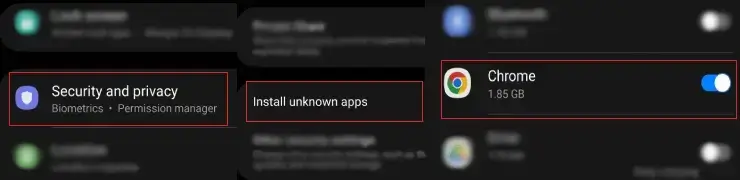
To easily install the Pepeta APK on Android, simply download it in Chrome.
- Click the download link on the Pepeta APK page.
- Accept any warnings you may see about potential harm.
- Install the app by visiting Chrome and tap the three-dot menu.
- Click Downloads to view the downloaded Pepeta APK.
- Click the APK, tap Install, and let it complete for a few moments. The app will now appear alongside your other apps.
Can I Download the Pepeta App for iOS?


Pepeta doesn’t have a Pepeta app on the App Store for iPhone users. You cannot download a native app at this time. However, the Pepeta website is fully optimized for mobile browsers. It delivers a smooth, responsive experience through Safari or Chrome on iOS.
All its core features, such as sports betting, Aviator, virtuals, and crash games, are accessible in the browser without any functionality loss. A dedicated iOS app is reportedly in development. Therefore, it’s worth keeping an eye on the App Store for future availability.
How to Add Pepeta Mobile Shortcut on iPhones & iPads
Adding a home screen shortcut through Safari gets you close to the native app experience.
- Open Safari.
- Go to pepeta.com.
- Log in to your account so the shortcut opens directly to your dashboard.
- Tap the Share icon at the bottom of the screen.
- Scroll down in the share menu and app, and add to Home Screen.
- Name the shortcut ‘Pepeta’ and tap. Add in the top right corner.
The Pepeta icon will now appear on your home screen just like any other app. Tapping it opens the full mobile website instantly. This is without going through Safari’s browser interface first. It won’t send push notifications as a native app would. However, the browsing, betting, and deposits are identical.
How to Use the Pepeta Mobile App?
The Pepeta app is well-structured and intuitive, making navigation easy for Kenyan punters. The bottom navigation is your primary tool. You can move from sports, casinos, virtuals, and crash games with a single tap.
- Place sports bets: Locate the specific sport and market. Click the desired odds and add them to your bet slip. Enter your preferred stake amount and place a bet.
- Playing Aviator: Head to Crash games, select Aviator, set your stake, and watch the multiplier climb. Tap “cash out” before the plane flies away.
- Deposits and withdrawals: Tap your account icon, then tap Wallet, then select Deposit or Withdrawal. Enter the amount. Follow the M-Pesa prompts. Deposits reflect almost instantly. Withdrawals take up to two hours.
We recommend turning on notifications after your Pepeta bet login in your phone settings. You’ll get time-sensitive promotions in time and won’t miss out on qualifying windows.
Pepeta Sports Betting App
The sports section on the Pepeta app is well optimized for mobile betting. The interface is friendly, with all sport markets arranged with all fixtures available. The bet slip sits at the bottom of the screen without obscuring the odds. Navigating between sports feels natural on a touchscreen.
- American Football
- Bandy
- Basketball
- Boxing
- Curling
- Darts
- eSports
- Football
- Futsal
- Handball
- Ice Hockey
- MMA
- Rugby
- Snooker
- Table Tennis
- Tennis
- Volleyball
- Water Polo
Football and basketball sit at the top of the sports menu. The market view for major fixtures expands into a well-structured list that’s easy to scroll through on a small screen.
Multi-bet/accumulator betting is fluid. You can add selections from different matches without losing your place in the list. The accumulator return updates in real time as you add legs.
Pepeta Bet Casino Games on a Mobile
The casino games section maintains the same functionality as on desktop. Online slots load smoothly without any buffering or lag. The live casino sessions are streamed in HD from professional studios with human croupiers. I didn’t experience any lag during my test sessions on the 4G connection.
The lobby features popular drops and wins, slots, hot, and live casino games. You can jump between slots, live tables, and crash games without getting lost.
Aviator is a popular go-to game on the app. Most users run it flawlessly on their Android devices with sharp animations and a responsive cash-out button.
The only limitation I noticed is that not all slots support landscape orientation. Most work in portrait mode only. This can feel cramped on larger-screen devices, such as tablets.
Pepeta Mobile Version Review

The Pepeta mobile browser is an excellent alternative for iPhone users or punters who prefer not to install an app or APK file. The gap between the mobile version and the app is relatively narrow.
Every primary function is available. This is from sports betting to casino games, virtuals, and crash games. Page load times are fast while on 4G connection. The layout adapts cleanly to different screen sizes without elements overlapping.
The only difference you’d notice is the absence of push notifications on the browser version. You won’t receive real-time alerts for promotions or free bet drops.
Pepeta App Features
The Pepeta app offers intuitive features to make your gaming experience smoother. The main app is sideloaded with multiple features, such as:
The cash-out option is available directly from the ‘My Bets’ section of the app. You can settle an active bet early and lock in a return based on current odds. This is useful when one leg of an accumulator is looking shaky, and you’d rather take a guaranteed amount than risk losing the entire slip.
A short cancellation window is available after placing a bet. This gives you a brief grace period to reverse a wager if you’ve made an error. It’s a rare feature among Kenyan betting apps, but a useful one nonetheless.
You can play several games available on the app in demo mode with no real money required. Aviator is the most popular crash game with a demo mode available. The demo version runs identically to the live game. This makes it genuinely useful for new players learning the mechanics or experienced players testing a new cash-out strategy.
Pepeta Bet App Bonus

Pepeta doesn’t currently offer a mobile app-only promotion. However, the bookmaker’s welcome bonus is fully accessible and claimable through the app with no limitations. Check the current term below for the exact details.
- Max. Amount: 25 Aviator Free Bets x KSH 10
Pepeta Mobile App Payment Methods
Pepeta’s payment setup is entirely built around mobile money. Both M-Pesa and Airtel Money are supported for deposits and withdrawals directly within the app. There’s no need to switch to a browser or desktop to manage your funds. Pepeta charges no hidden transaction fees on either end.
| Payment Method | Deposit Minimum | Deposit Maximum | Time for Deposit | Minimum Withdrawal | Withdrawal Maximum | Time for Withdrawal |
|---|---|---|---|---|---|---|
 M-Pesa M-Pesa | 1 KES | 500 000 KES | Instant | 50 KES | 200 000 KES | Instant |
FAQ
Is the Pepeta app download APK free?
Indeed. The Pepeta APK app is completely free to download. You can download the APK file straight from APKPure. Alternatively, search for “Pepeta: Sports, Crash & Casino” in the Google Play Store to install it for free.
How to download the pepeta app latest version?
The Google Play Store is the easiest place to get the most recent version of the Pepeta app. You’ll always get the latest version of the app. There are automatic updates when you download it from the Play Store.
Is the Pepeta app available on IOS?
Not currently. There is no active native app available on the App Store for iPhone users. You can still access the complete Pepeta platform via Safari on mobile. The browser experience is smooth and fully functional.
How do I login to the Pepeta app?
Open the app and tap the login button on the home screen. Enter the phone number and password you registered with, then tap confirm. If you’ve forgotten your password, use the ‘Forgot Password’ option and follow the reset instructions sent to your registered number.

His work shows up across sportsbooks, casino operators, affiliate sites, and gaming brands. He covers slot mechanics, live dealer strategy, match previews, and value betting tactics. The goal is always the same: cut through the noise with content that actually helps players decide. That means comparing RTP percentages or reading a Champions League line with zero fluff.
From high-volatility slot reviews to CS2 esports markets, the range is broad. The mission isn't. Create content that informs, entertains, and converts.
When he's not dissecting bonus terms or hunting for +EV bets, he's probably lost in Football Manager.
