

PantherBet Register Online

Signing up for a new account at PantherBet South Africa takes a maximum of 5 minutes. You’ll need to provide some important information, like your full name, house address, and ID number. Unlike some gambling websites in SA, no SMS or account verification is required to successfully register on PantherBet. However, if you want to have access to withdrawals, you’ll need to complete FICA verification on your account. In this review, I’ll guide you through the PantherBet register process and share the essential terms to note before signing up.
| PantherBet Registration Took Me: | Less than 5 Minutes |
| Mobile Number Required | Yes |
| SMS Confirmation | No |
| Immediate Verification Needed | No |
PantherBet Quick Registration Steps
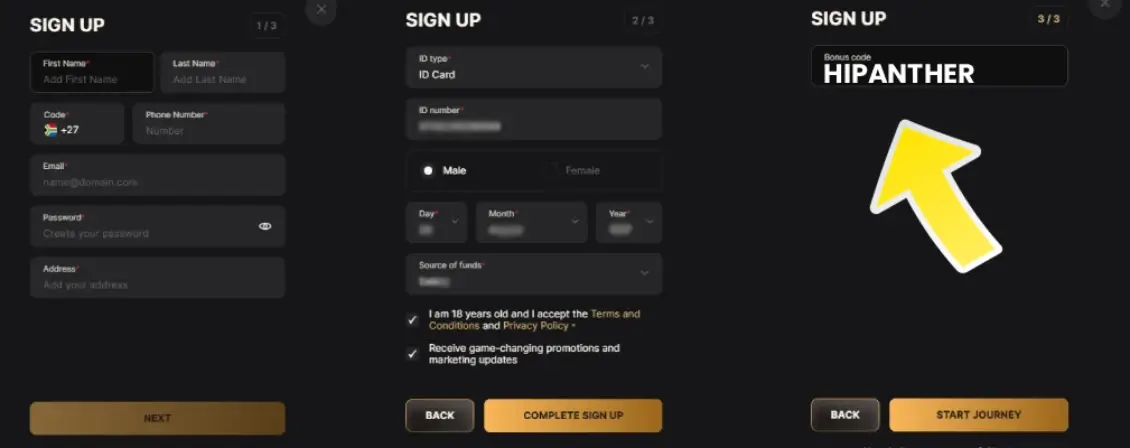
Completing your PantherBet register online takes no more than 5 minutes and involves three main steps. These steps are represented by the three-page sign-up form, which I’ll show you how to complete below:
- To begin the PantherBet register process, visit the official website and click the “Sign Up” button at the top.
- On page one, enter your full name, phone number, email, password, and residential address.
- On page two, select an identification type (passport or government-issued ID) and enter the number.
- Also, enter your birth date, gender, and source of funds, then agree to the T&Cs and promotion updates before clicking “Complete Sign Up”.
- On the third and final page, enter the PantherBet promo code to claim the no-deposit welcome bonus, then click “Start Journey”.
As you can see, the PantherBet registration process is pretty straightforward and does not require SMS confirmation or FICA verification. However, if you want to access the site’s full features and benefits, it’s important to start and complete account verification immediately.
You can do this by going to the “Verification” menu in your profile and then following the steps. One of the immediate benefits you’ll get for verifying your account is the no-deposit bonus, which also requires a bonus code to be activated.
PantherBet Registration Information
The entire process for the PantherBet register online South Africa can only be completed by providing your personal data. The most important of these are your full legal name, a valid phone number, an active email, and your home address information. When entering these into the form, ensure you cross-check everything carefully before moving to the next page.
In addition to these, you’re also required to enter your date of birth, gender, and source of funds. The last information is necessary in order to adhere to WCGRB regulations regarding online gambling in South Africa. Like I noted earlier, every piece of information provided must be accurate and should match the data on your identity card. This will speed up FICA verification, which is necessary after completing the PantherBet sign up process.
PantherBet Register Terms & Conditions
All South African customers who want to complete the Panther Bet register online process must understand the operator’s requirements. These T&Cs are quite extensive, but I’ll list the most essential items to note before registering and during your stay.
- You must not fill out the Panther Bet register form or attempt to access the website unless you are 18 years or older.
- You are a resident of South Africa and of sound mind and capacity to take responsibility for your online gambling.
- Your account must not be used for any professional, business or commercial purposes beyond your personal entertainment.
- You must not have signed up to a national self-exclusion register which excludes you from participating in gambling.
- All information used when registering on the website must be accurate and complete in all respects.
- Your account details must be up to date, and if you require any assistance with this, contact customer service via email.
PantherBet Login

Once registration is successful, you’ll be logged in to your account automatically to start depositing funds. The next time you visit, you’ll need to sign in again, and fortunately, the Panther Bet login South Africa procedure is straightforward. There are two ways to access your account, as shown in the login steps below:
- Open the PantherBet website on your browser and click the “Sign In” button on the homepage.
- For the phone Panther Bet login method, enter the cell number and password you used during registration.
- For the email PantherBet login method, enter the email address and password you used when signing up.
- Finally, click “Sign In” to be granted access to your Panther Bet register account.
In situations where you may have forgotten your password, you can initiate a password recovery to access your account. Here’s how to do this:
- Click “Forgot Your Password?” on the Panther Bet login page.
- Enter your email in the box and click “Reset Password” to continue.
- Go to your inbox and follow the instructions in the mail to reset your PantherBet register login password.
If you want to avoid forgetting the password, you can save your Panther Bet login registration information in your browser. Usually, desktop and mobile browsers like Chrome will ask for your permission to save your email/phone number and password.
Simply agree to this, and you won’t have to enter them whenever you want to sign in to your account. It’s important to note, however, that you should not authorise the auto-login feature if another person has access to your PC or smartphone.
PantherBet FICA

As a licensed South African gambling brand, PantherBet is required by the Financial Intelligence Centre Act (FICA) to verify the identity of all customers. The process is mandatory, and although you can complete your PantherBet registration without it, account verification is needed before withdrawals.
The following personal information will be required at various stages:
- Full names
- Residential address
- Date of birth
- Email address
- Mobile and/or landline telephone number
- SA identity number or passport number
- Source of the funds to be used for betting
- Deposit method data
- Any other relevant information
To begin and complete FICA verifications on your account, follow these steps below:
- Log in to PantherBet and click “My Account” on your profile.
- Enter the “Verification” page and click “Continue”.
- Click “Start Verification”.
- Read the brief T&Cs, then click the “Agree and Continue” button.
- Select the document type, which should match what you used during the PantherBet sign up process.
- Upload the document (ID card or passport) and complete the liveness check to complete the procedure.
If more information is required, such as a utility bill to verify your address or a bank statement, you’ll be notified. All uploaded documents are reviewed within 24 hours, but it may take longer during peak times. If, for any reason, your FICA verification was unsuccessful, you’ll get an email explaining why and the next steps to take.
PantherBet Registration on a Mobile
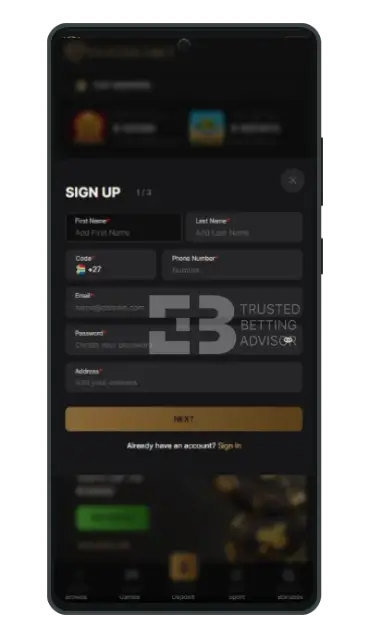
The registration steps for Panther Bet login South Africa are the same whether you’re using a mobile device or a desktop. Many players spend a lot of time on their smartphones, so this is the most common avenue for signing up. The only difference between the desktop and mobile versions is the size of the screen. Buttons appear larger, and the landscape view on PCs makes everything look clearer.
PantherBet Register Bonus
One of the first things you’ll enjoy after completing the Panther Bet register South Africa form is bonuses. There’s a welcome package for sports and casino, and you’ll need a PantherBet promo code to activate some of them. Other promotions are available for existing customers, which you’ll benefit from by returning regularly to play on the website.
- Max. Amount: R14,000
- Min. Deposit: R10
- Min. Odds: 1.80
How Do I Make My First PantherBet Deposit?
Most bonuses at PantherBet require a minimum deposit to be activated. You’ll also need to have funds in your account to play casino games and bet on sports. To make your first deposit, here’s what you should do:
- Use your PantherBet register online login information to access your account.
- Click the green “Deposit” button on the homepage to enter the cashier section.
- Explore the available deposit methods and choose your preferred option from the list.
- Enter a deposit amount, which must be at least 10 ZAR.
- Tap the “Deposit” button to complete your transaction and follow any additional steps offered by the payment provider.
| Payment Method | Deposit Minimum | Deposit Maximum | Time for Deposit | Taxes |
|---|---|---|---|---|
 Bank Wire Transfer Bank Wire Transfer | R10 | R100,000 | Instant | Free |
 EFT Secure EFT Secure | R10 | R30,000 | Instant | Free |
 Credit Cards Credit Cards | R10 | R500,000 | Instant | Free |
 Debit Cards Debit Cards | R10 | R500,000 | Instant | Free |
 Visa Visa | R10 | R500,000 | Instant | Free |
 MasterCard MasterCard | R10 | R500,000 | Instant | Free |
 OTT Vouchers OTT Vouchers | R10 | R4,999 | Instant | Free |
 Blu Voucher Blu Voucher | R10 | R4,999 | Instant | Free |
 Shop2Shop Voucher Shop2Shop Voucher | R10 | R4,999 | Instant | Free |
 EasyPay Voucher EasyPay Voucher | R10 | R4,999 | Instant | Free |
 SnapScan SnapScan | R10 | R500,000 | Instant | Free |
 Ozow Ozow | R10 | R100,000 | Instant | Free |
 ApplePay ApplePay | R10 | R4,999 | Instant | Free |
 1VOUCHER 1VOUCHER | R10 | R4,000 | Instant | Free |
 Scan To Pay Scan To Pay | R10 | R500,000 | Instant | Free |
| Payment Method | Withdrawal Minimum | Withdrawal Maximum | Time for Withdrawal | Taxes |
|---|---|---|---|---|
| Bank Wire Transfer | R100 | R100,000 | Instant | Free |
| EFT Secure | R100 | R100,000 | Instant | Free |
| Credit Cards | N/A | N/A | N/A | Free |
| Debit Cards | N/A | N/A | N/A | Free |
| Visa | N/A | N/A | N/A | Free |
| MasterCard | N/A | N/A | N/A | Free |
| OTT Vouchers | R100 | R5,000 | Instant | Free |
| Blu Voucher | N/A | N/A | N/A | Free |
| Shop2Shop Voucher | N/A | N/A | N/A | Free |
| EasyPay Voucher | N/A | N/A | N/A | Free |
| SnapScan | N/A | N/A | N/A | Free |
| Ozow | R100 | R100,000 | Instant | Free |
| ApplePay | N/A | N/A | N/A | Free |
| 1VOUCHER | N/A | N/A | N/A | Free |
| Scan To Pay | N/A | N/A | N/A | Free |
Common Registration Problems & Solutions
Several issues might prevent you from successfully completing the PantherBet Casino register process. I’ve looked into the most common problems that could cause this and provided quick fixes below:
- Inaccurate user credentials: Your registration may be unsuccessful if you provide wrong personal information, especially when it doesn’t match the data on your ID. You can avoid this by cross-checking all the information you enter into the form, including their spellings.
- Multiple accounts: The PantherBet register download system is designed to detect duplicate accounts. You can’t sign up on the platform if the email, phone number, or identity document has been used to open an account previously. To sort this problem, ensure you register with your personal information and not a third party.
- Blocked country: PantherBet is legally authorised to operate only within South Africa. If you’re outside the country, you can’t register or use your PantherBet Casino login information to access your account. Ensure you’re located in SA before trying to sign up to avoid this.
FAQ
What do I need to register on PantherBet?
To complete the Panther Bet register South Africa form, you’ll need to provide some personal details – full name, email and your home address. Other necessary information is your phone number, ID number, date of birth and the source of funds.
How do I log into PantherBet Casino?
To access your account, click the “Sign In” button and enter the PantherBet Casino login information you provided during registration. You can use either of the two sign-in methods, which are the email or phone number options.