

PlayTSOGO Login & Registration Steps

PlayTSOGO Register in Under 3 Minutes
The PlayTSOGO registration process is quick and straightforward. While the procedure follows standard online betting site requirements and may take a few minutes, it is straightforward to complete.
During the PlayTSOGO South Africa sign-up, you will be required to provide the following details:
- First and last name
- Date of birth
- Nationality
- Mobile number
- Email address
- Residential address
- Username
- Password
Once you have completed and submitted the registration form, you can log in immediately, with no instant verification required.
Author: Javia AlexPlayTSOGO Login Accessibility
The PlayTSOGO login is available once you have successfully created an account. After doing so, you can proceed to the login form and enter your username or phone number, along with your PlayTSOGO login password, to access your account.
PlayTSOGO has conveniently included two options - “Forgot Password” and “Forgot Username”, which aim to assist users with account recovery if needed.
Signing up for a PlayTSOGO co za account is a walk in the park. While reviewing the site, I registered an account in under three minutes by providing my name and e-mail address, then verifying my phone number through SMS. Once done, I was able to log in and get into my account to deposit and begin playing casino games.
If you’re looking to enroll in the PlayTSOGO register, I’ve got you covered with all the details you need and the steps to follow. Continue reading this guide for more information.
| PlayTSOGO Registration Took Me: | 3 Minutes |
| Mobile Number Required | Yes |
| SMS Confirmation | Yes |
| Immediate Verification Needed | No |
PlayTSOGO Register Steps
Registering an account with PlayTSOGO requires a few simple steps. It took me under three minutes to complete the process and have my profile ready. Here are the steps required:
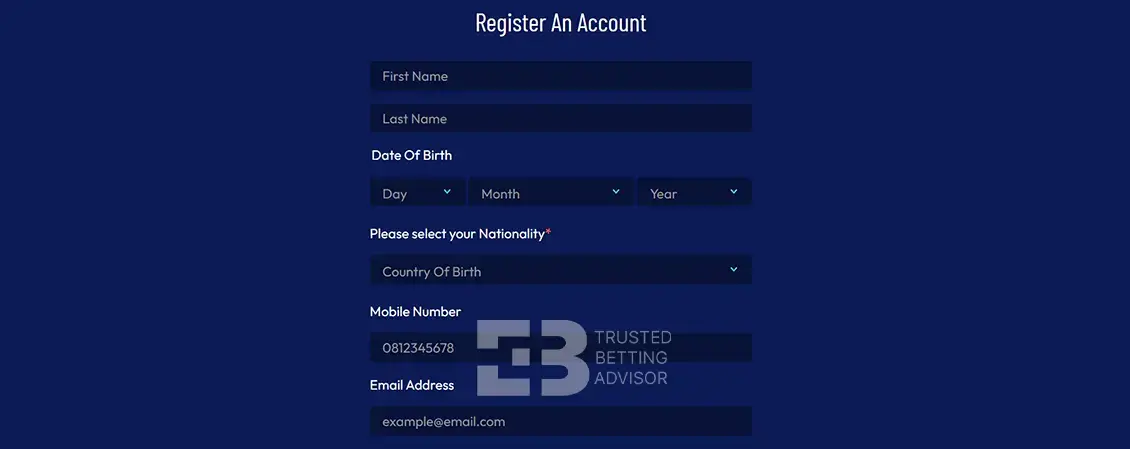
- Head to the official PlayTSOGO website on your mobile device.
- Once you land on the homepage, you’ll see the “Sign Up” button at the top corner.
- Enter your name in full, date of birth, nationality, telephone number, email, and residential address.
- Choose a username and create a strong password.
- Accept the terms and click on “Join“.
PlayTSOGO Login Steps
Once you have finished the PlayTSOGO registration, it is not hard to log in to your account. Here’s how:
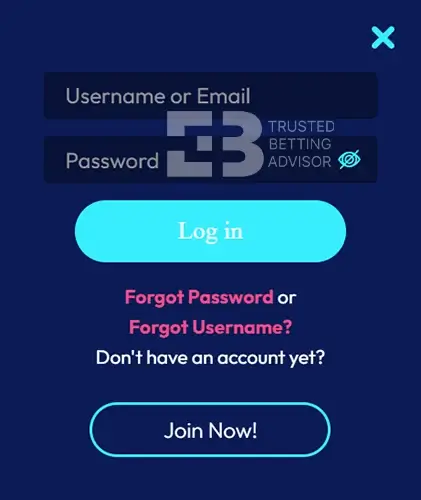
- Visit the PlayTSOGO site: Simply open up your web browser on your mobile device and go to the official PlayTSOGO website.
- Click on Login: Tap on the Login button located on the top right corner of the homepage.
- Provide your details: Enter the username or email you used when creating your account. Then, enter your password.
- Click Login: Once you’ve entered your correct details, click on Login.
- Done: You’ll now have access to your account.
PlayTSOGO Login Information
When you sign up for a PlayTSOGO account, the service requires some important personal details to keep everything secure. You have to provide your full name, birth date, nationality, phone number, email address, and house address. These details not only help verify you are of age and you’re where you say you are, but also help the site to protect your account.
You also choose a username and password when signing up. Once your profile is set, you simply need your username or email and password for your PlayTSOGO South Africa login.
PlayTSOGO Register Terms & Conditions
Here are the main points you need to keep in mind when joining and using PlayTSOGO:
- This is for anyone 18 years old and above.
- All personal information you provide must be correct since the site may ask for verification later.
- You can keep one account, and no duplicates are allowed.
- Keep your login details private to protect your account.
- The site may close your account if it detects cheating, fraud, or misuse of bonuses.
- Withdrawals and certain bonuses may require extra checks or documents before they’re approved.
PlayTSOGO FICA
Like all licensed operators in South Africa, PlayTSOGO needs to verify your identity through FICA (also called KYC). You’ll have to go through this process before the first withdrawal.
Here are the documents you’re required to provide:
- Proof of Identity: Take a picture of your ID, showing all four corners or both sides if it’s a card. You can also submit a certified copy.
- For Proof of Residence: You’ll need something within the last three months, including a municipal bill, bank statement, or lease agreement.
You’ll have to upload them to the PlayTSOGO website or email them to support@playtsogo.co.za. The team will process your request within 24 hours and give you feedback.
PlayTSOGO co za Login Registration through a Mobile
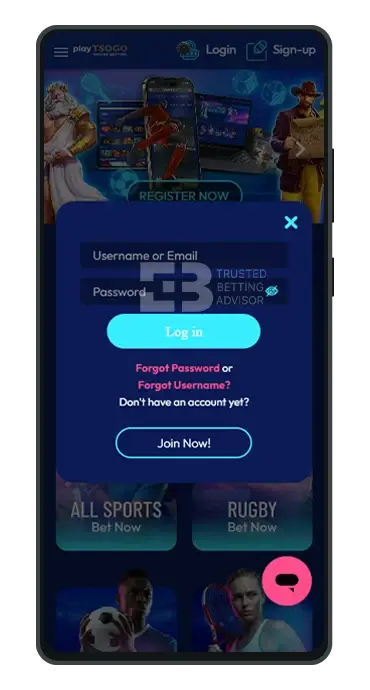
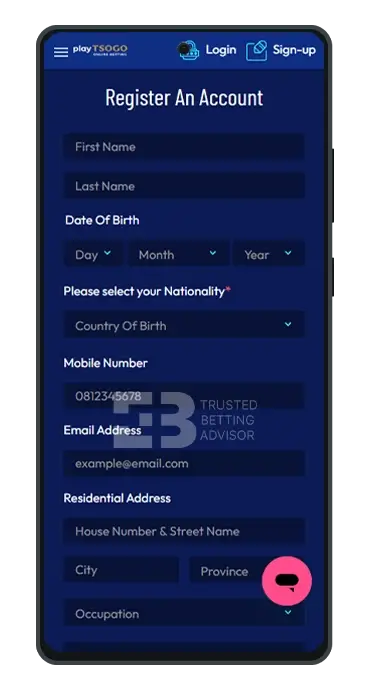
I tried to sign up for PlayTSOGO via mobile and desktop and discovered that the process is the same. You’ll fill in the same information and follow identical steps. The main difference is that the interface layout for mobile is optimized for smaller screens.
PlayTSOGO Register Bonus

As a new player, you can claim various bonuses for casino gaming or sports betting when you deposit using the PlayTSOGO promo code. The site also has no deposit promotions for new users.
- Max. Amount: R20,000
- Min. Deposit: R50
- Bonus code:
- Min. Odds: 1.90
- Wagering: 6x
How Do I Make My First PlayTSOGO Deposit?
PlayTSOGO accepts many payment methods for making deposits in South Africa. You can use options like EFT Secure, OTT Voucher, credit and debit cards, and CapitecPay. Once you’ve registered and wish to fund your account, here are the steps to follow:
- Log in to your PlayTSOGO account.
- Click on the deposit button in the top corner.
- Choose your preferred payment method.
- Enter your deposit amount.
- Click on “Deposit“.
You’ll be redirected to the checkout page for your preferred deposit method to complete the process.
| Payment Method | Deposit Minimum | Deposit Maximum | Time for Deposit |
|---|---|---|---|
 OTT Vouchers OTT Vouchers | R5 | Not Stated | Instant |
 1VOUCHER 1VOUCHER | R5 | Not Stated | Instant |
 Zapper Zapper | R50 | Not Stated | Instant |
 Blu Voucher Blu Voucher | R5 | Not Stated | Instant |
 Absa Bank Absa Bank | R50 | Not Stated | Instant |
 EasyPay Voucher EasyPay Voucher | R5 | Not Stated | Instant |
 EFT Secure EFT Secure | R50 | Not Stated | Instant |
 Peach Payments Peach Payments | R50 | Not Stated | Instant |
 Capitec Pay Capitec Pay | R50 | Not Stated | Instant |
 iVeri Card iVeri Card | R50 | Not Stated | Instant |
Common Registration Problems & Solutions
The PlayTSOGO sign up process is mostly smooth sailing. But if you experience any issues, no worries. Here are the most common problems and how to fix them.
Ensure your PlayTSOGO login password meets the requirements. It must contain at least eight characters, with letters and numbers. Another thing is that if you try entering a username that someone else has used, you’ll get an error message. So, try something else, and make it unique.
If you have an unreliable internet connection, that’s going to impact your signing up for the program. Make sure you have a good Wi-Fi or mobile data connection and refresh the page.
There are times when the PlayTSOGO gets high traffic or undergoes maintenance, and it can be difficult to register during such periods. If the pages won’t load or the buttons are not working, give it a few minutes and refresh.
PlayTSOGO only allows one account per person. If you’re blocked from creating an account, you may already have one registered with your details. Contact support to recover your existing account.
PlayTSOGO services are limited to certain regions. If you can’t register, your location might not be supported. VPNs won’t help here because the platform verifies your address during FICA anyway.
FAQ
How long should the PlayTSOGO login password be?
The password for PlayTSOGO register online login should be at least eight characters long. You’re also required to use a mix of letters and numbers.
Does the PlayTSOGO.co.za login require a cell phone number?
You only need to provide your phone number when signing up and not for logging in. The site only requires a username or email when signing in.
Is the PlayTSOGO register online safe?
Yes, it’s safe to register online at PlayTSOGO because it’s licensed by the Western Cape Gambling and Racing Board. The site also uses SSL encryption to protect your data.
Can I start a PlayTSOGO registration data-free?
You can’t start a PlayTSOGO registration without mobile data or a WiFi connection. The site needs an active internet connection to load the signup form and submit your details.