

ZarBet Login Link & Register Steps

Online bettors in South Africa can sign up on ZarBet in five quick steps, which take 3 minutes at most. Some of the information needed for successful account creation are your email, date of birth, and full name. It’s also mandatory to enter a valid phone number, which will be verified via SMS to confirm it’s yours.
At this stage, FICA verification is not compulsory, but a request will be made for it when you want to make the first withdrawal from your account. In the ZarBet register and login review, I’ll detail the steps required for a successful registration at ZarBet. I’ll also share some essential FICA requirements and operator T&Cs for you to note before creating an account.
| ZarBet Registration Took Me: | Less than 3 Minutes |
| Mobile Number Required | Yes |
| SMS Confirmation | Yes |
| Immediate Verification Needed | Yes (email and phone number) |
Zarbet Register Steps
Creating a new account to set up your ZarBet Casino login information takes less than 3 minutes. It’s a single-page form that must be completed only with correct details to avoid verification problems. Here are the simple steps to take to get your account up and running:
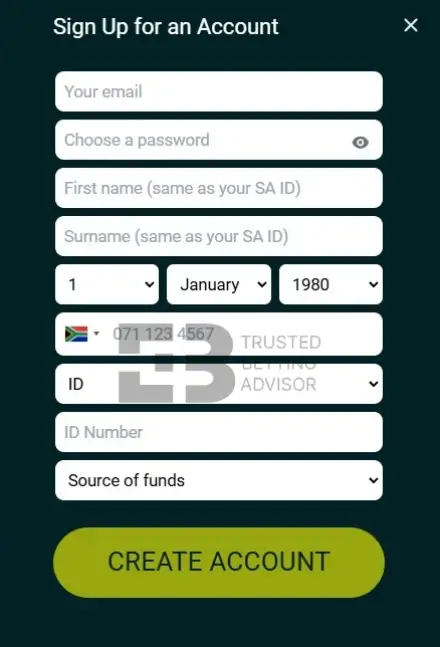
- Visit the official website of ZarBet South Africa and click the “Sign Up” button at the top.
- Enter a valid email address and create an alphanumeric password to secure your account.
- Next, enter your South African cell number, first name, surname, and date of birth.
- Choose your preferred identity type (passport or ID card) and enter the document number.
- Indicate your source of funds and click “Create Account” to complete the ZarBet register procedure.
Although your identity document will be confirmed and saved during registration, you must complete FICA verifications before the first withdrawal.
ZarBet Sign-up Info
Before undergoing the Zarbet login registration process, you must have a valid South African phone number and an active email. Both need to be verified to ensure you’re not impersonating someone else. This is also done for your own protection so that other people, including ZarBet staff, can’t access your account without authorisation.
To confirm your email, you’ll receive a link in your inbox that you should click to verify. For phone number confirmation, an OTP code will be sent as an SMS, and you’ll need to enter it on the website. Other things needed to successfully register an account are your date of birth and full name. It’s crucial that all the info you’ve provided matches the data shown on your SA identity document.
Although FICA verification happens during registration, you may be asked to submit more documents before withdrawals. After completing the sign-up process, the phone number you used becomes your Super Sport Bet login username.
ZarBet Casino Register TnCs
The terms and conditions for registration and betting on ZarBet South Africa are provided on the website. However, I’ve picked out the most essential T&Cs you need to keep in mind before signing up for your account.
- You must be over 18 to register an account and be ready to provide your proof of age documents whenever asked.
- You are a resident of South Africa and can prove it with an identity document whenever needed.
- You must act in good faith in relation to the use of ZarBet for betting.
- You have to provide accurate contact information and keep it updated at all times.
- You are only allowed to register one account on the website. Duplicate accounts are subject to immediate closure if it is discovered that you opened more than one.
Zarbet Login
Your Zarbet login South Africa info includes the email and password you used during registration. The account login process is simple and can be completed in three steps shown here:
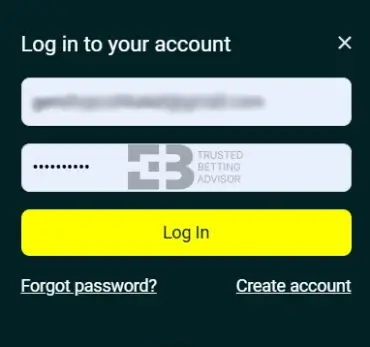
- Launch the ZarBet website on your mobile or desktop browser.
- On the homepage, click the “Log In” button at the top.
- Now enter your registered email address followed by the account password to sign in.
You can skip these steps and log in faster if you don’t want to manually type your email and password each time. To do this, simply save the ZarBet Casino login South Africa info into your browser.
Modern browsers like Chrome will usually send a notification asking you to save the information. Once you agree to it, signing in to your account becomes instant. A quick tip to note, however, is that you should use this feature only when no one else has access to the device.
If you’re ever in a situation where you can’t remember your password during a manual login attempt, ZarBet offers a reset option, which you can carry out as follows:
- Click the “Forgot Password?” tab on the ZarBet login page.
- Choose whether to use the mobile phone or email option to reset your password.
- Type your phone number or email address along with the birth date you registered with.
- Tap “Submit,” and a reset code will be sent to your email or SMS inbox.
ZarBet FICA
The Financial Intelligence Centre Act is a legislative framework designed to prevent illegal use of online gambling sites. It mandates all such platforms to carry out compulsory verification on users.
Fortunately, the FICA verification steps at ZarBet are simple and can be completed quickly. These are what is required at various stages.
- Your full name.
- Your passport or ID number.
- A clear photo of your identity document.
- A utility bill that’s not older than 3 months.
- A valid email address.
- A valid phone number belonging to you.
- Your occupation.
All registered ZarBet players are required to start and finish FICA verifications before making the first withdrawal. However, I suggest you do yours much earlier to avoid any unforeseen delays during withdrawals. To begin, send an email to the support team at support@zarbet.co.za and attach your documents. Alternatively, you can upload the required documents yourself on your ZarBet account.
ZarBet Registration on a Mobile
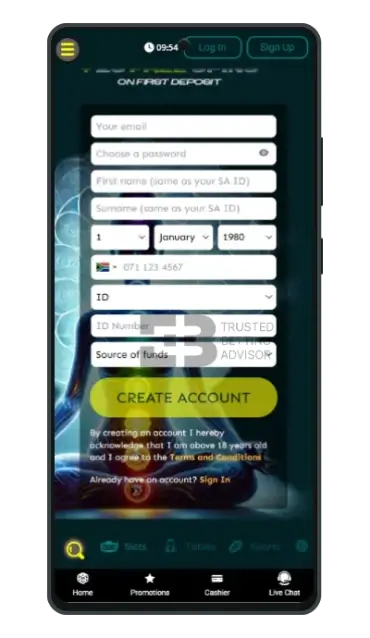
The registration procedure for new South African players at ZarBet is the same whether you’re using a desktop or mobile device. For most users like myself, the mobile version is preferable mainly because of its ease and accessibility. It’s also more convenient because you can create an account anytime and from anywhere.
For contrast, however, the only noticeable difference between mobile and desktop registration is screen orientation. On smartphones, the website is oriented in portrait mode, but has a wider landscape orientation on PCs and large-screen tablets.
ZarBet Register Bonus
After signing up on ZarBet SA, you’re offered a welcome bonus, which you can use to start playing games. Other promotions are also available on the website, and like the welcome offer, you’ll need ZarBet bonus codes to activate them.
- Max. Amount: R3,750 + 25 FS
- Percentage: 125%
- Min. Deposit: R20
- Bonus code:
- Wagering: 30x
How Do I Make My First ZarBet Deposit?
To access bonuses and place bets at ZarBet, you must add real money to your account. The payment process takes less than 5 minutes, and these are the steps to take.
- Sign in to your ZarBet account by clicking the “Log In” button at the top of the homepage.
- Enter your email address followed by your password and click “Log In”.
- Tap the “Deposit” button at the top right corner to see the available payment methods.
- Choose your preferred banking type from the list of credit/debit cards, vouchers, and mobile money options.
- Enter the amount you want to add to your account, which should be above the minimum deposit limit for your chosen payment option.
- Click “Proceed” to complete the deposit process.
| Payment Method | Deposit Minimum | Deposit Maximum | Time for Deposit | Taxes |
|---|---|---|---|---|
 Bank Wire Transfer Bank Wire Transfer | R20 | R1,000 | Instant | Free |
 EFT (Electronic Fund Transfer) EFT (Electronic Fund Transfer) | R20 | R1,000 | Instant | Free |
 Visa Visa | R20 | R1,000 | Instant | Free |
 MasterCard MasterCard | R20 | R1,000 | Instant | Free |
 AMEX AMEX | R20 | R1,000 | Instant | Free |
 Capitec Pay Capitec Pay | R20 | R1,000 | Instant | Free |
 Samsung Pay Samsung Pay | R20 | R1,000 | Instant | Free |
 ApplePay ApplePay | R20 | R1,000 | Instant | Free |
 OTT Vouchers OTT Vouchers | R20 | R1,000 | Instant | Free |
 1VOUCHER 1VOUCHER | R20 | R1,000 | Instant | Free |
 Zapper Zapper | R20 | R1,000 | Instant | Free |
 Masterpass Masterpass | R20 | R1,000 | Instant | Free |
| Payment Method | Withdrawal Minimum | Withdrawal Maximum | Time for Withdrawal | Taxes |
|---|---|---|---|---|
| Bank Wire Transfer | R250 | R37,500 | within 48 hours | Free |
| EFT (Electronic Fund Transfer) | N/A | N/A | N/A | Free |
| Visa | N/A | N/A | N/A | Free |
| MasterCard | N/A | N/A | N/A | Free |
| AMEX | N/A | N/A | N/A | Free |
| Capitec Pay | N/A | N/A | N/A | Free |
| Samsung Pay | N/A | N/A | N/A | Free |
| ApplePay | N/A | N/A | N/A | Free |
| OTT Vouchers | N/A | N/A | N/A | Free |
| 1VOUCHER | N/A | N/A | N/A | Free |
| Zapper | N/A | N/A | N/A | Free |
| Masterpass | N/A | N/A | N/A | Free |
Common Registration Problems & Solutions
You may encounter certain issues while signing up that prevent you from setting up an account on ZarBet. Some of these are:
- Wrong data: This happens when your name doesn’t match the information on your ID or passport. To avoid it, check the spelling and ensure that you’ve written it exactly as it appears in your document. This means using your surname and first name in their right positions.
- Duplicate account: The system may refuse to register your new account if it’s recognized as a duplicate. To solve this, enter an email and a phone number that have not been used previously to open an account on ZarBet. If this doesn’t work, you will need to use another device if the IP has been used to register on ZarBet.
- Restricted access: Only South African residents are allowed to register at ZarBet. If you’re outside the country or using a VPN from a restricted location, you may be unable to sign up successfully. To avoid any restrictions, ensure you’re physically located in South Africa before opening a new ZarBet account.
FAQ
How long does it take to register on ZarBet?
Registering a new account on the ZarBet website will take you less than 3 minutes. The sign-up form has only one page, where you’ll need to enter information such as your full name, email, phone number, date of birth, and source of funds.
Do I need to complete FICA verification during registration at ZarBet?
No, it’s not compulsory to complete FICA verifications when registering a new account at ZarBet. However, FICA compliance is necessary before you can withdraw funds from your account.
Can I register a new ZarBet account using a mobile device?
Yes, you can open a new account at ZarBet with your smartphone or tablet. Simply visit the official website on your mobile browser and click the “Sign Up” button to start and finish registration.