
Bet9ja is a local favorite betting brand trusted by Nigerian bettors. The online betting platform makes placing a bet very simple: log in to your account, choose an event and market, add odds to the bet slip, enter a stake, and confirm. Our team tested out the platform, and here’s a detailed breakdown of how to bet on Bet9ja for Nigerian bettors.
How to Play Bet 9ja
Our team signed up for an account at Bet9ja to test their experience on how to play bet 9ja for Nigerian bettors. We found that the controls sit in different positions when using desktop or mobile. Here is a simple process on how to play bet naija by placing bets:
1. Log In and Open the Sports Section
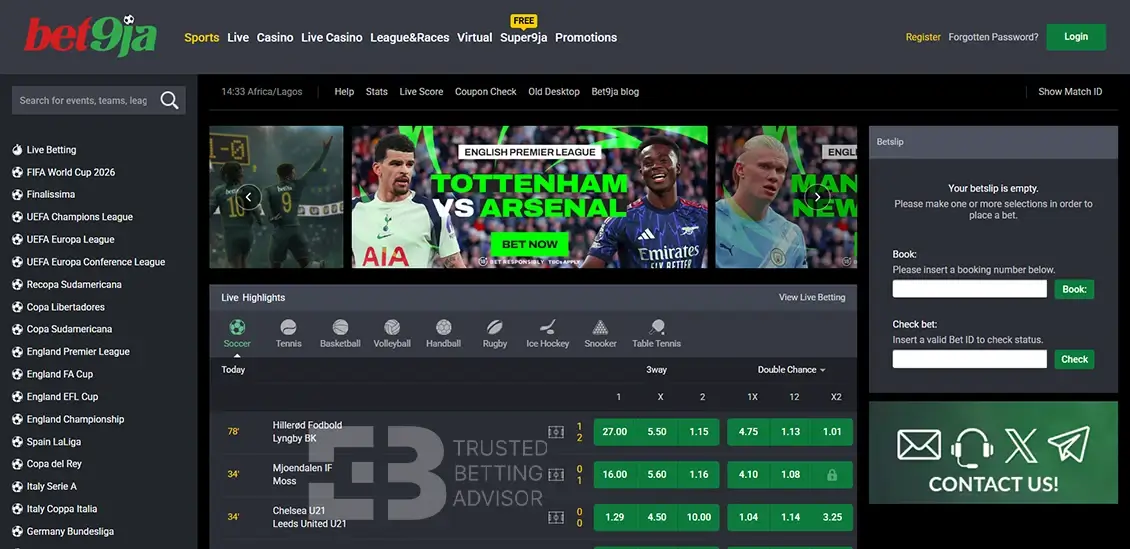
Based on our Bet9ja review, the login process starts with your mobile number and password to access the homepage. The sports section is the first selection on the menu, followed by the live navigation label for live events. Clicking ‘Sports’ opens the full sportsbook straightaway.
2. Choose a Sport, League and Event
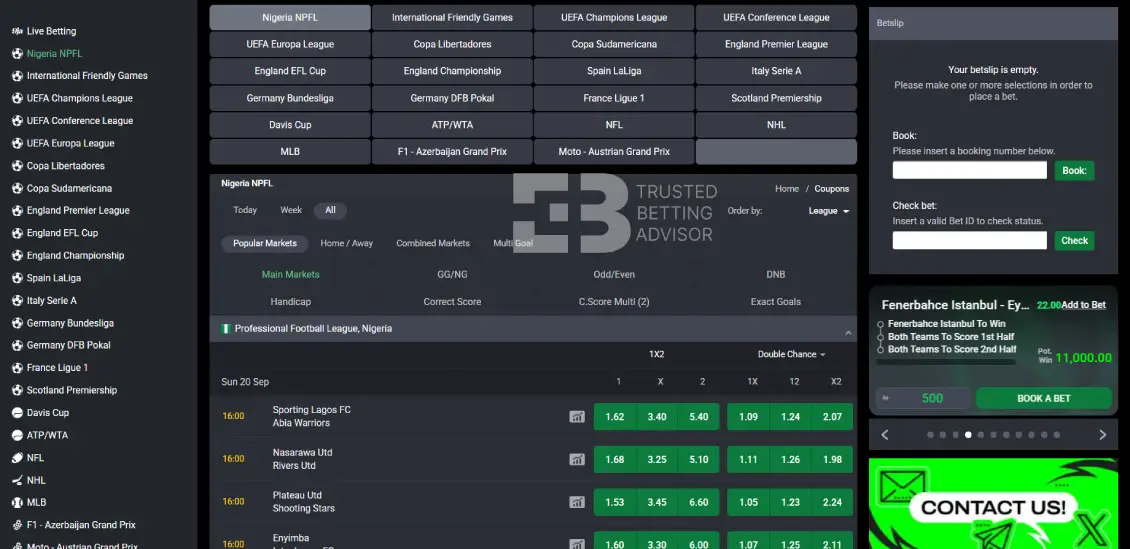
Available sports are listed on the left in a dropdown menu in alphabetical order. There’s a search bar where you can filter events, teams, and leagues. For example, you can search ‘Arsenal’ or ‘England Premier League’ to access all Arsenal and Premier League events available. The events are arranged by date, time, teams, and markets.
3. Select a Market and Add the Odds
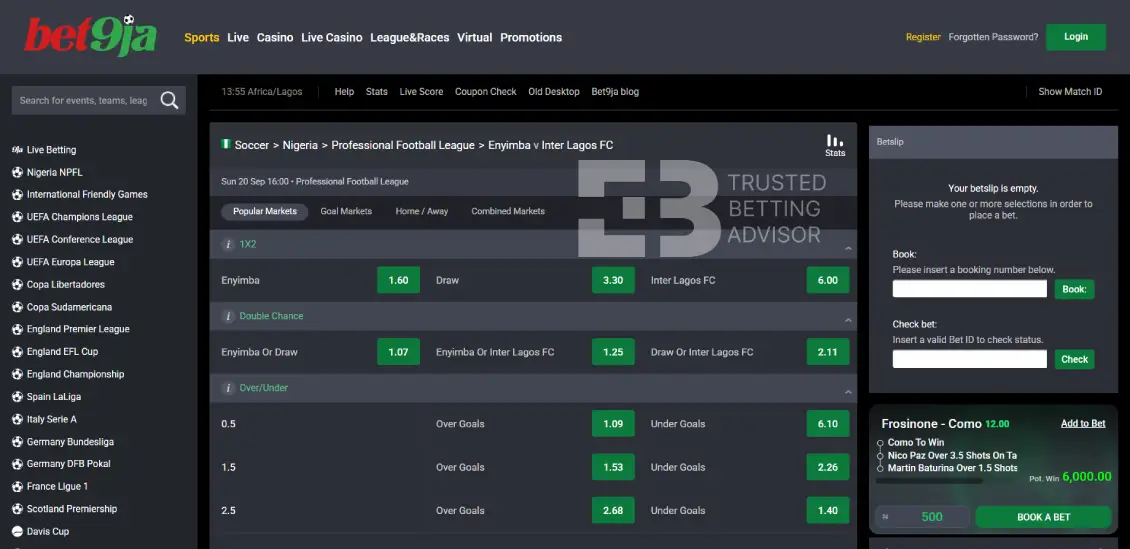
Tap on your preferred event, and it opens to the available betting markets and their odds. Each event contains odds for the 3-way (1X2) market plus other popular markets. You tap the odds for one outcome that is added to your bet slip. After clicking the odds, the green button turns yellow after adding your selection.
4. Set Up the Betslip
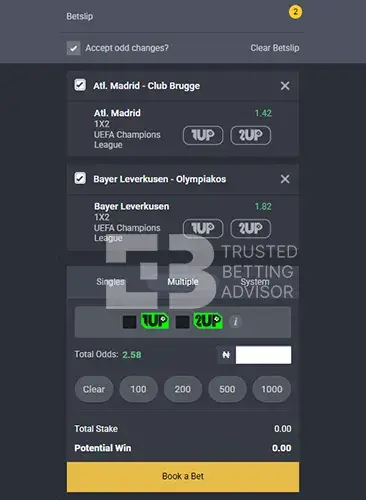
The Betslip tab sits on the right panel that’s present when adding your selections, alongside OPEN BETS. Each selection lists the event, market, and odds. There’s an ‘X’ sign to remove any selection from the betslip. There are unique Bet9ja booking codes on recommended markets where you can copy and paste a code to recreate that exact combination instantly. This is highly useful when sharing codes with other bettors to build the same combination.
5. Enter the Stake and Confirm the Bet
After opening the bet slip with your added selections, it’s time to enter your stake into the designated field. You can add all single stakes of 100, 200, 500, and 1,000. Afterwards, the system automatically calculates the total stake and potential win. Sometimes the odds can change abruptly, set by the bookmaker, thus affecting your bet. Confirm all your placements before and finish off by hitting the action button ‘Book a Bet.’
6. Check the Confirmation and Bet ID
After confirming your bet, you’ll receive a confirmation message pop-up on your screen as your ticket moves to ‘Open Bets’ on the right panel. The ticket gets assigned a unique bet ID for easy tracking. Your balance shown in the top right corner updates to reflect the stake deducted. If no confirmation shows or your balance stays unchanged, check the ‘OPEN BETS’ tab before trying again.
How Do You Place Different Types of Bets on Bet9ja?
Bet9ja supports single, accumulator, and live bets for Nigerian bettors. The process of adding selections is similar across all three methods. The only difference is the number of selections and changes within each selection with the bet builder feature. Here is a look at each bet type available on the platform:
How to Place a Single Bet on Bet9ja
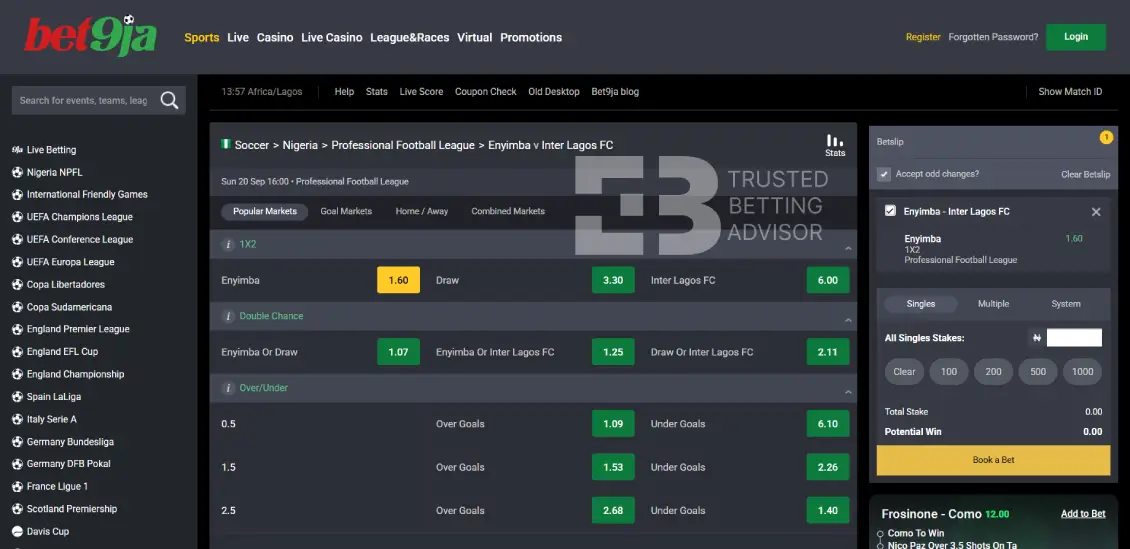
The first step to learn how to play Bet 9ja is placing a singles bet. Click the odds for one outcome, such as ‘Arsenal’ under the ‘1X2’ market, to add it to your bet slip on the right. Make sure the ‘Singles’ tab is selected as the active tab and not the ‘Multiple’ or ‘System’ bet.
Enter your stake and your potential wins updates after multiplying by the total odds. For example, a stake of NGN100 at odds of 1.19 would return roughly NGN119 if the bet wins. Complete the process by clicking ‘Book a Bet’ to submit.
How to Place an Accumulator Bet on Bet9ja
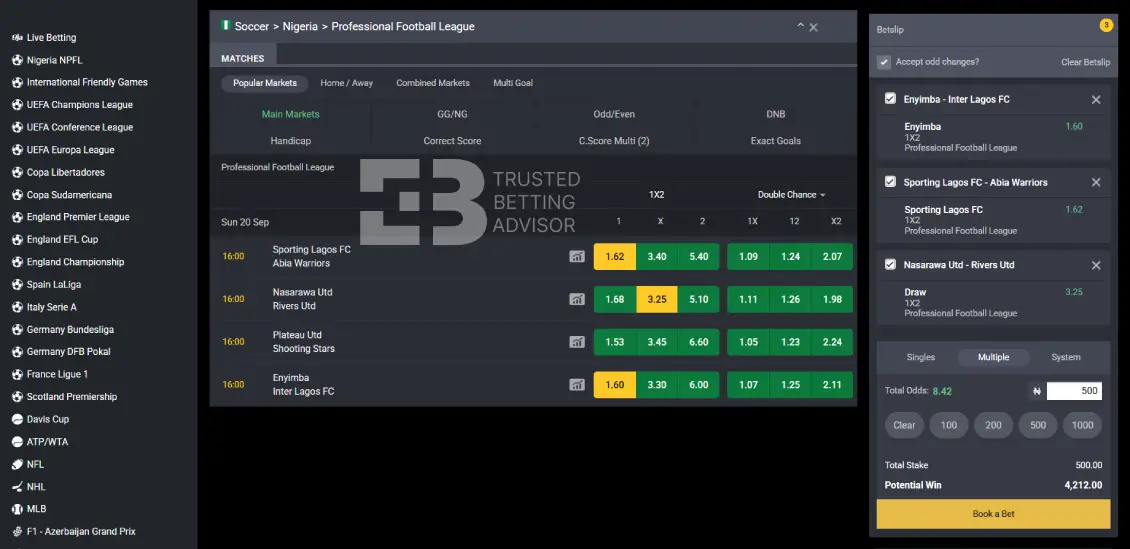
Your singles bet becomes an accumulator when you add another selection(s) in the same bet slip. Each selection stays listed individually, showing the match, market, Bet9ja bonus, and odds. Also, there’s the ‘Total Odds’ that’s calculated by multiplying every selection together, climbing higher as you add more legs.
Enter your stake, and ‘Potential Wins’ updates instantly above the confirm button. If one leg loses, the whole accumulator loses regardless of whether remaining selections are finished. Bet9ja also offers a ‘System’ tab alongside Multiple. This is useful if you’d rather cover several smaller combinations within a larger selection instead of needing every leg to win.
How to Place a Live Bet on Bet9ja
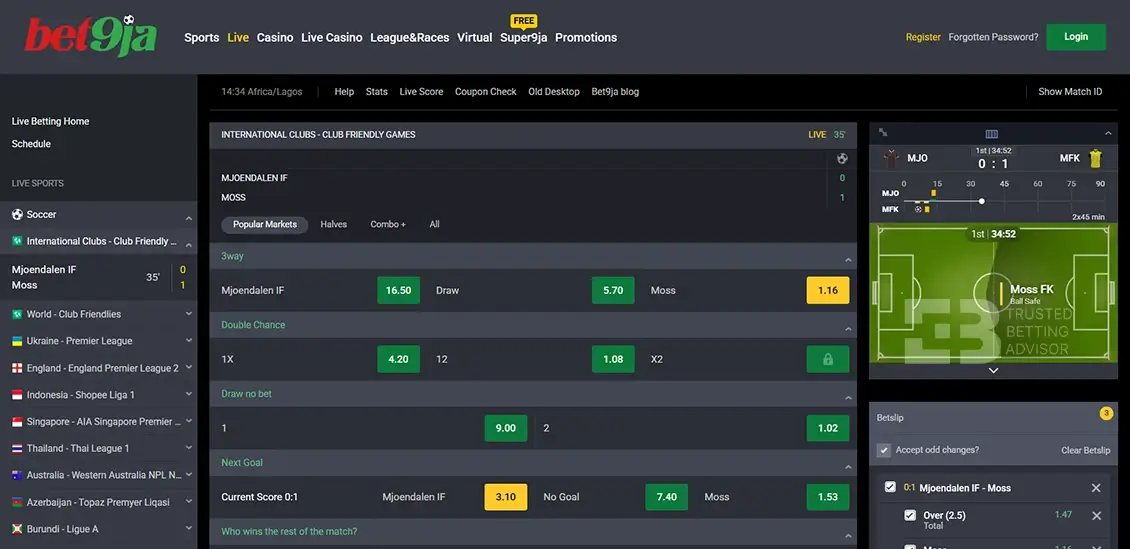
Bet9ja has a dedicated tab for live events next to sports on the menu. Click ‘Live’ in the main navigation menu to enter the in-play section. This is where you’ll find ongoing matches displayed and the running time. There’s a live match tracker on the right panel showing current attacking play.
The live bet has multiple odds changes as momentum shifts constantly. This means odds and markets can shift mid-event. Your bet must fall within the acceptable window before confirmation. After your selection is added and stake entered, click ‘Book a Bet’ within the short acceptance window shown on the slip.
How Do You Check and Track a Bet on Bet9ja?
Checking and tracking your bets is simple at Bet9ja due to the straightforward system. After logging into your Bet9ja account, click on the ‘Sports’ section.
After opening the ‘My Bets’ section to see the history of all placed bets on the platform. Click on the available bet, and it will expand your bet history. This section shows all accepted cashout changes and lets you view all bets.
Each bet is assigned a unique ID/reference number, result, and cash out status if used on the available selection.
After confirming each bet and pressing the ‘Book a Bet’ option, it gets sent to the ‘Open Bets’ tab. This makes it easier to view all your active and inactive bets confirmed from the bet slip.
After final confirmation, it means your bet has been accepted. A pending bet means it’s yet to be settled. A won bet means your selection matched the result, while a lost bet means you didn’t match the result.
Can You Cancel or Edit a Bet on Bet9ja?
It’s only in limited cases that you can cancel or edit a bet on Bet9ja. We recommend double-checking your bet slip after adding selections. It’s possible to cancel or add selections at this stage since there’s no confirmation.
After placing and confirming a bet, both in-play and live bets can’t be edited or deleted. Even if you encounter issues when confirming your bet and it went through, you can’t change. The system automatically detects it as a valid bet.
The only way to edit a placed bet at Bet9ja is through the cash out option. It’s possible to partially settle your bet before the final match event.
Why Can’t You Place a Bet on Bet9ja?
Nigerian bettors sometimes complain of struggling to place a bet on the platform. It could be a technical issue on the platform’s end or simply insufficient funds to place a bet. Here are common reasons why you can’t place a bet on the platform and its solution:
System maintenance
Bet9ja carries out regular system maintenance to ensure top-notch services for bettors. This maintenance includes software updates, security checks, or database cleanups. During maintenance times, the operator shuts down core services such as placing bets until the servers come back online.
Unverified identity
Bet9ja requires bettors to complete KYC documentation as per requirements by the National Lottery Commission before allowing wagers. Foregoing the KYC documentation might restrict your access to placing bets.
Self-exclusion
Active responsible gambling blocks freeze the bet placement button for subscribed users. You must complete your self-exclusion period to reactivate the bet placement function again.
Insufficient funds
The bet size exceeds the available funds in your Bet9ja wallet. Check your wallet balance to ensure you have enough funds. If necessary, deposit a sufficient amount that covers your wager size.
How To Bet Responsibly on Bet9ja?
Despite the ease of betting when logging into Bet9ja, it is important to control your betting activities. Responsible betting means betting within your means and knowing betting outcomes are uncertain. Here are ways to practice it while at Bet9ja:
- Take online betting as a form of entertainment and not a means of regular income
- Schedule breaks between betting sessions after either a win or a loss
- Set betting limits to control the maximum stake you can bet daily
- Avoid chasing losses after a bad run to avoid accumulating more losses
- Only bet with money you’re comfortable losing
Frequently Asked Questions
What Is the Minimum Bet on Bet9ja?
The minimum stake for any event on Bet9ja is NGN 200. The maximum bet amount you can win at Bet9ja is NGN 10,000,000.
Can You Bet on Bet9ja with Bonus Funds?
Yes, you can learn how to use the Bet9ja bonus to wager on qualifying bets. However, any winnings from bonus funds carry wagering requirements before any withdrawal.
What Does a Pending Bet Mean on Bet9ja?
A pending bet refers to one that has been accepted by Bet9ja’s system but is yet to be fully settled. It appears under ‘Open Bets’ until the outcome is officially confirmed.
How Do You Know If Your Bet9ja Bet Won?
You can check under ‘Open Bets’, where all settled bets at Bet9ja appear. Winnings are credited automatically to your wallet balance after an event’s outcome.
Can You Place a Bet9ja Bet Without an Account?
No, you need to register an account at Bet9ja before placing any bet. Bet9ja requires an account with verified details, since Nigerian regulations mandate identity checks before real money wagering.
