
Betwinner is a standout bookmaker making waves among Nigerian bettors due to its simple bet-placing process. Start by logging in, choose an event and market, add the odds to the bet slip, enter a stake, and confirm. Our team reviewed the bookmaker to understand how to bet on Betwinner and provides a complete breakdown below.
How to Bet on Betwinner Step by Step
Our team tested the full process on Betwinner, from login through selecting an event and market, using the Betwinner booking codes, to a placed wager. Controls sit differently between desktop and mobile. Hence, exact positions might shift depending on your device.
1. Log In and Open the Sports Section
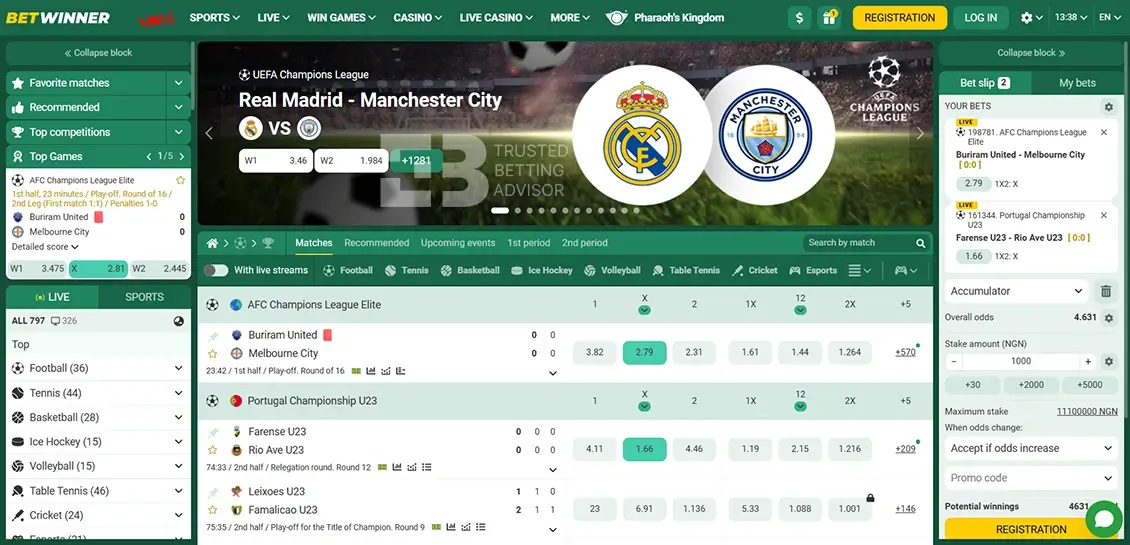
Based on our Betwinner review, you’ll input your email/phone number and password to access Betwinner’s homepage. You’ll see the account balance and main account details top right, alongside deposit and message icons. The ‘SPORTS’ section appear as its own dedicated dropdown in the main navigation bar alongside ‘LIVE.’ Clicking ‘SPORTS’ opens the sportsbook directly, landing on the match listings by default.
2. Choose a Sport, League and Event
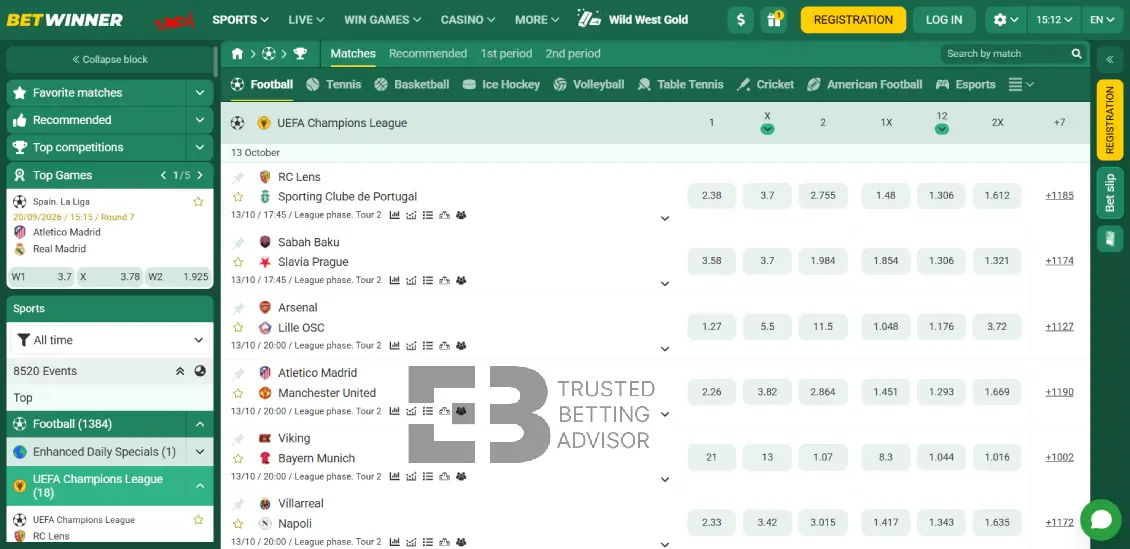
Sport icons run down the left sidebar, with ‘Football’ near the top. Clicking through reveals competitions like Premier League, listed with fixtures grouped by date beneath. Selecting a match like ‘Chelsea,’ opens straight into that events’ odds within the same listings view.
3. Select a Market and Add the Odds
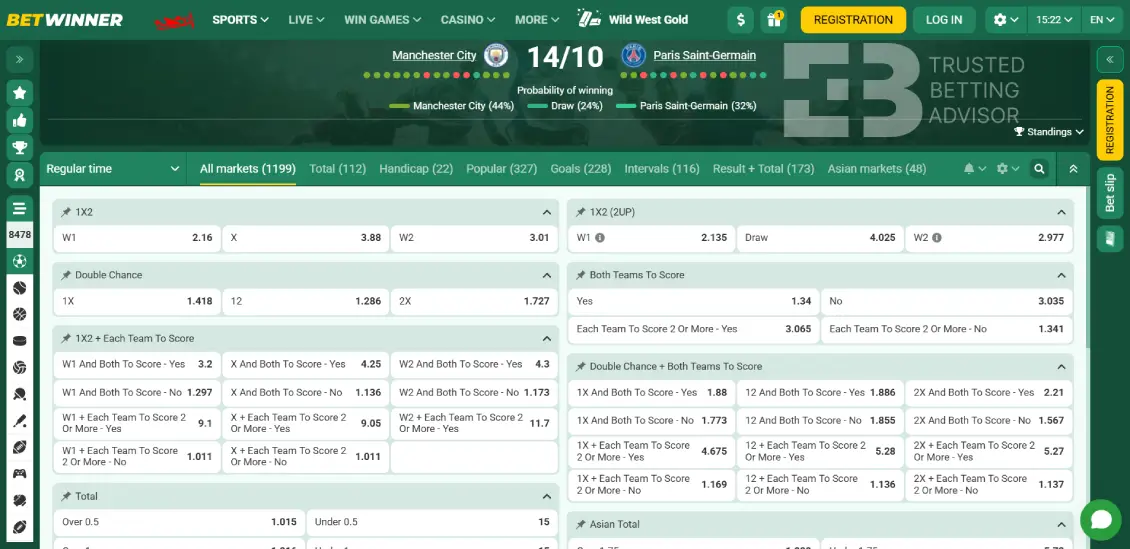
Each fixture displays the main market (1X2) directly within the listings, showing three clickable odds columns. Click an odd highlights it in green and adds the selections to ‘YOUR BETS’ on the right. This replaces the ‘Add events to the betslip’ placeholder text as visual confirmation. The betslip pops up showing your added selection, and odds.
4. Set Up the Betslip
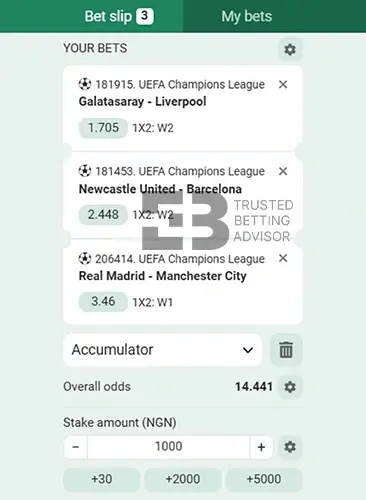
The betslip sits on the right hand panel, and pops after adding a selection. Your selection lists the match, market, and odds, with an ‘X’ beside it to remove a pick. A dropdown labelled ‘Single Bet’ lets you switch modes upon further selections. Betwinner displays a unique reference number above each pick, and offers ‘Save/load events’ if you have a Betwinner betcode. This lets you reload a previously saved selection using an event code.
5. Enter the Stake and Confirm the Bet
After adding your selections, the next step is setting your stake. Ensure your account wallet is funded first before proceeding. Enter your stake under ‘Stake amount’ using the quick-add buttons like +30, +1000, and +5000. ‘Overall odds’ and ‘Potential winnings’ display just above the confirm button. It updates live as the stake changes. A ‘When the odds change’dropdown lets you choose how price movements are handled. Once ready, click ‘Place Bet’ to submit.
6. Check the Confirmation and Bet ID
Once accepted, you’ll receive a confirmation message as the ticket carries a reference number, shown directly above the match name in the slip. The new bet appears under ‘My Bets’ for easy tracking. If there’s no confirmation message, or your balance doesn’t update, refresh the page and check ‘My bets’ before retrying.
How Do You Place Different Types of Bets on Betwinner?
Choosing selections is similar across every bet type on Betwinner. What changes is how many picks are added, and the timing on a bet. Here are various bet types supported by Betwinner:
Read more: how to use the Betwinner bonus
How to Place a Single Bet on Betwinner
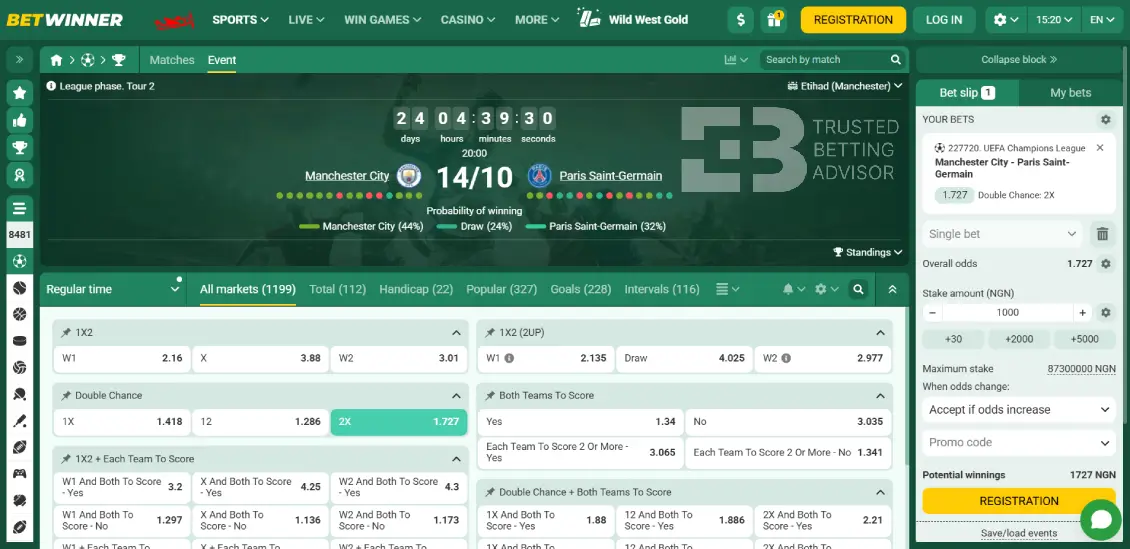
A single bet is a simple format that only involves selecting one prediction. Click the odds of an event for one outcome such as home win, draw, or away win. It will automatically add it to ‘YOUR BETS’ on the right panel. One selection automatically flips the slip default to ‘Single bet.’
Enter your stake under ‘Stake amount’ and ‘Overall odds’ display just above, confirming the rate you’re betting at. For example, a NGN2,000 stake at odds of 2.00 will be NGN4,000.
How to Place an Accumulator Bet on Betwinner
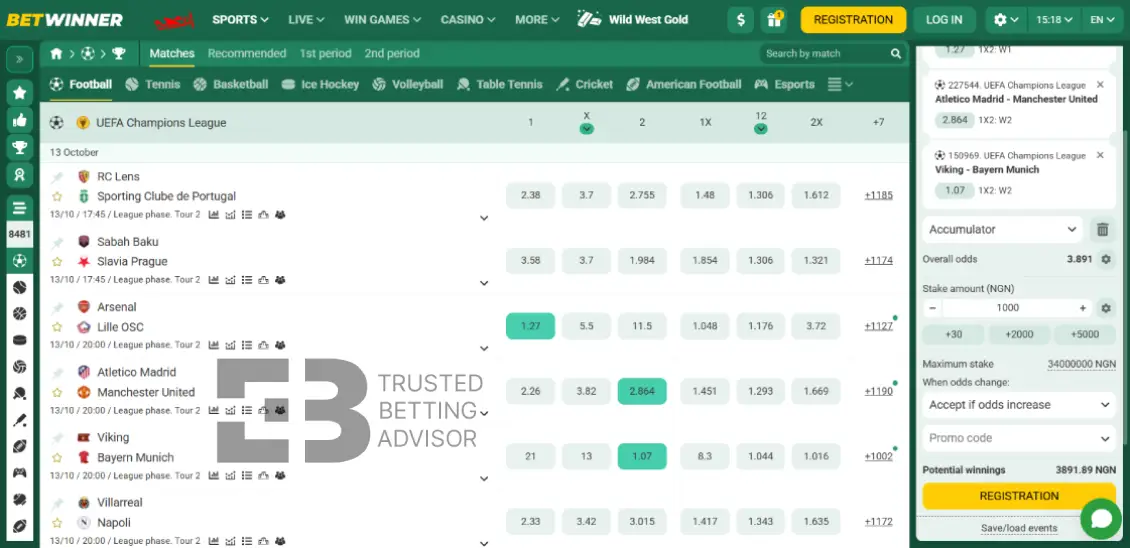
An accumulator bet supports two or more selections in the same betslip. Adding another selection to your Singles bet automatically switches the slip mode to ‘Accumulator.’ Each pick stays listed individually, while ‘Overall odds’ multiply as more legs join in. Enter your stake once, and when one event loses, the entire accumulator fails.
How to Place a Live Bet on Betwinner
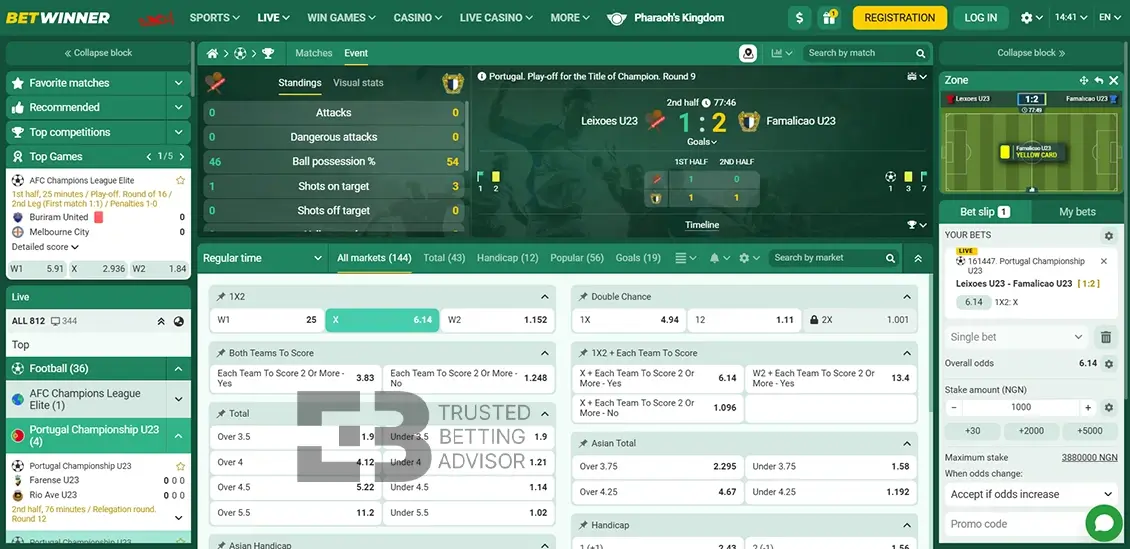
Betwinner has a dedicated tab for ‘Live Betting’ where you’ll find live matches with their current market pricing. The ongoing matches show live scores, match time, and detailed stats such as shots on target and ball possession.
Select a match and it expands the entire markets available. The odds market fluctuate as the action unfolds and momentum shifts. You need to confirm your selection within the acceptable window to lock in the price as shown in that instant. Enabling ‘Accept if odds changes’ under ‘When odds changes’ helps your bet go through even after a price shift.
How Do You Check and Track a Bet on Betwinner?
Tracking a bet on Betwinner is straightforward from the same panel used to place it. Click ‘My Bets’ beside ‘Bet slip’ in the top right, opening two tabs: ‘Open’ and ‘History.’ “Open” shows bets still active and waiting for results. The history tab covers all bets settled.
After placing a wager, it moves into ‘Open,’ confirming it’s been accepted. It will remain active until the event finishes. Afterwards, it shifts into ‘History’ once resolved, settling on ‘won’ or ‘lost’ depending on the outcome.
After an event concludes, the ticket shifts into ‘History,’ settling as ‘Won’ or ‘Lost’ depending on the outcome. Any void bets receive a full refund.
If you don’t want to wait for the full result, you can activate the cash out option on available events. This lets you cash out an open bet early at the current odds.
Can You Cancel or Edit a Bet on Betwinner?
Editing and cancelling a bet is only possible in limited cases. The first case is adding or removing a selection from your betslip before placing your bet. There’s an ‘X’ sign next to each selection where you can remove a selection.
The moment you place a bet and a confirmation message appears on your screen, it becomes a valid bet. Thereon, it’s impossible to edit or cancel any selection from the final betslip.
The only exception where you can edit the final bet slip is activating the cash-out option. Cashing out early means you get early payment before the final match outcome.
Why Can’t You Place a Bet on Betwinner?
A rejected bet on Betwinner usually comes down to several reasons. Here’s what’s likely going on:
Suspended market
The bookmaker can pull odds temporarily around goals, injuries, or news updates, especially for live betting. Therefore, your selection might go offline as you tried confirming it. There’s a part where you ‘Agree to Odds Changes’ before placing a bet to confirm this incidence.
Minimum/maximum stake
The minimum stake for any selection at Betwinner is NGN90, while the maximum vary by sport and event. Placing an unusually large stake on a low liability match can get rejected outright by the bookmaker.
Bonus restrictions
Active bonuses often cap the maximum stake per bet. Using those funds outside those limits, or on ineligible markets, will block the wager. Read the T&Cs of each claimed bonus to understand accepted markets and maximum stake limits.
Account limits or KYC
Unverified accounts at Betwinner can face restrictions such as placing bets. The bookmaker might request you complete the Know Your Customer (KYC) with full documentation before proceeding with your betting activities at any time.
How To Bet Responsibly on Betwinner?
There are many ways you can bet responsibly while at Betwinner from setting limits to recognizing your emotions. See all our tips for responsible betting on the online platform:
- Set time and financial limits, including deposit and loss limits, to prevent overspending
- Recognize your emotions, as impulsive decisions based on stress and anger can lead to irresponsible play
- Seek help when you’re not in control of your betting activities through hotlines for professional guidance
- Activate the voluntary self-exclusion program on Betwinner to get some time off from betting for 1 month, 6 months, or 1 year.
Frequently Asked Questions
What Is the Minimum Bet on Betwinner?
The minimum bet on Betwinner starts from NGN90, while the maximum bet varies depending on the sport and market.
Can You Bet on Betwinner with Bonus Funds?
Yes, active bonuses allow bettors to place wagers dictated by the Betwinner bonus terms and conditions. The bonus funds dictate the markets to bet on and the maximum stake per bet.
What Does a Pending Bet Mean on Betwinner?
A pending bet is found in the ‘My Bets’ section, which represents all active bets yet to be resolved. After final confirmation of the match outcome, it becomes a closed bet.
How Do You Know If Your Betwinner Bet Won?
You can know if your Betwinner bet won if the amount in your wallet increases. Alternatively, check history in the ‘My Bets’ section to see final match outcomes from your bet slip.
Can You Place a Betwinner Bet Without an Account?
No. According to the regulations from the National Lottery Regulatory Commission (NLRC), any bettor must create and verify their account at a bookmaker before withdrawing any winnings.
