
Betano Login in Nigeria + Problems & Solutions


The registration process at Betano NG is simple and takes just 2 minutes to complete. You’ll need to provide a valid phone number, which will be verified via SMS. Account verification will also be carried out immediately using your National Identification Number (NIN) for registration to be successful. On this page, I’ll share my take on the sign-up procedure and how to handle any issues you might encounter.
| Betano Registration Took Me: | 2 minutes |
| Mobile Number Required | Yes |
| SMS Confirmation | Yes |
| Immediate Verification Needed | Yes |
Betano Login My Account – Step by Step
Accessing your account after registration is simple and takes a few seconds. There are three Betano NG login methods to choose from, depending on your preference. You can also log in with your Google or Facebook account if you had initially signed up with either of them.
For the regular Betano com login Nigeria options, you can follow these simple steps:
By Username
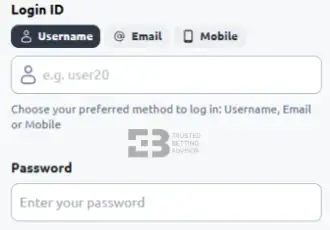
- Open the Betano website and tap “Login” at the top of the page.
- Select the “Username” option, then enter your ID and Betano NG login password.
- Tap the green “Log In” button to finish.
By Email
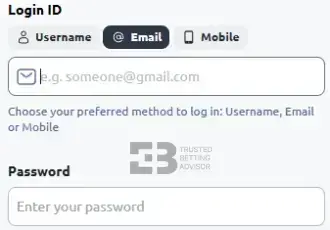
- On the Betano login online page, choose the email sign-in method.
- Enter the email you registered with, along with your password.
- Finish up by tapping the “Log In” button.
By Phone Number
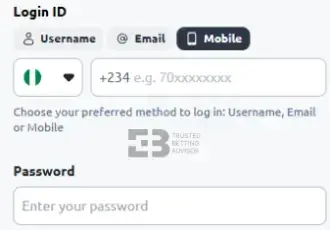
- Select the Betano mobile login method on the sign-in page.
- Enter your registered cell number and password in the spaces provided.
- Tap the green “Log In” button at the bottom to access your account.
Betano Login Problems in Nigeria
Certain issues can prevent you from signing in to your account successfully. These are the most common login Betano problems you might face and how to sort them out:
Incorrect Login Details
Trying to complete the Betano login procedure with a wrong username, email, or mobile number will not work. This mistake is common with customers who may have opened betting accounts on other sportsbooks using different login information.
You can prevent this by enabling the autofill feature on the website, which saves your login data. If you want, you could also write your Betano NG login details somewhere safe so you don’t forget them.
Account Blocked or Suspended
If your Betano account is blocked or suspended, it means you’ve been restricted for violating the company’s rules. There are many things you could have done to trigger this, including creating multiple accounts on the website.
The best way to recover your account is by sending a message to customer support. You can also avoid the situation entirely by taking some time to read through Betano’s terms and conditions.
Forgotten Password or Username
It’s possible to forget your password or even the username for your account. Good enough, Betano offers a simple recovery option that allows you to reset them quickly. To begin, go to the login page and tap the “Forgot password? Click here” link.
You’ll be given two recovery options (email or mobile number) to choose from. Regardless of your choice, you must provide the correct contact details you used when registering the account. After submitting the information, you’ll get an OTP via SMS, email, or voice call to reset your Betano NG login password.
Betano App Login
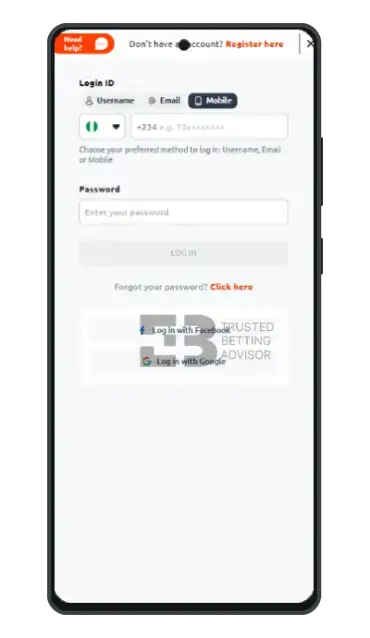
The Betano login app for Android and iOS has a design and UI that’s similar to the website. If you’re already familiar with the platform’s interface, then completing your Betano mobile login in Nigeria should be easy. First, you’ll need to download and install the Betano app from Google’s Play Store or Apple’s App Store. Once you have it on your device, launch the software and authorise permissions like location access.
On the main application page, tap the “Login” button at the top and choose from the three sign-in methods. After entering your Betano mobile login data, which must be correct, click “Log In” to access your account. If you already have the software on your smartphone, the Betano login app procedure will only take seconds. For those who had to download it first, the whole process can be completed in less than 5 minutes.
Betano Registration Steps
Setting up a new Betano account as a first-timer is equally easy. If you’ve never used the platform before, here’s how to carry out the Betano registration login Nigeria using your email:
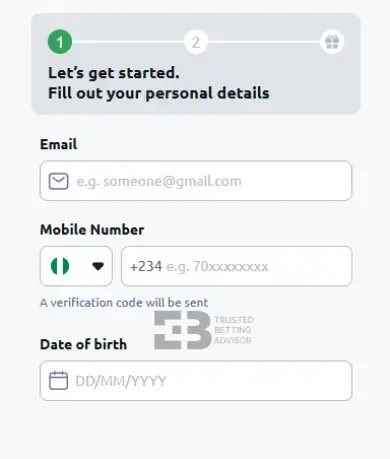
- Visit the official Betano NG website and click “Register” at the top of the homepage.
- Tap the green button that says “Register with your email” to view the registration form.
- Provide your email and mobile number, followed by your date of birth.
- On the pop-up screen, enter the 4-digit code that was sent via SMS to your phone.
- An automatic verification is carried out, and your NIN will be displayed for you to confirm.
- Provide your source of income and occupation, then tap “Next”.
- For the final step in the Betano com login registration process, enter your preferred username and password, then tap “Register” to finish.
It’s important to use an NIN-linked phone number during the Betano sign up process. However, if your current mobile number is not connected, you’ll be asked to enter your NIN manually.
Betano Registration Information
The most critical Betano registration information you need to open an account is a valid phone number. Not only is it used to validate your identity as a Nigerian, but it will also be verified via SMS. Both of these actions are necessary for a successful Betano com login Nigeria experience.
Other information that needs to be shared includes your email, date of birth, sources of income, and occupation. These are all mandatory as part of the company’s AML policy. Just before submitting the registration form, you’ll also be asked to provide a username. Although some suggestions will be offered, you can still go ahead and enter one that’s more personal to you.
Betano Sign up Terms & Conditions
- You must be over 18 years of age to sign up and participate in the games offered on the website.
- Your participation as an actual person should be in a non-professional capacity for recreational and entertainment purposes only.
- All information provided in the form, including your Betano registration number, must be accurate.
- It is solely your responsibility to protect your Betano online betting login details.
- If you do not log in to your account for a period of 30 months, the operator will remit all remaining balances in your account to you.
Account Verification
KYC verification is carried out automatically during the Betano sign up procedure. According to information on the help desk, members don’t need to submit any personal documents for account verification. This is because the NIN-linked Betano registration number provided at registration is used to confirm your identity.
However, you may be asked by the operator to verify your payment methods if the need arises. One common reason is that you’ve linked multiple bank cards to your account. If you find yourself in this situation, you’ll need to provide a photo of the requested card showing your name. For successful verification, the name must match the one on your account.
Betano Register Bonus for Nigerian Players
After completing the Betano sign up login process, new Nigerian customers are offered a welcome bonus to start betting with. No Betano promo code is needed to claim this offer, but you’ll have to meet the minimum deposit requirement.
- Max. Amount: ₦200.000
- Percentage: 50%
- Min. Deposit: ₦100
- Bonus code:
- Min. Odds: 3.00
- Wagering: 10x
Common Registration Problems & Solutions
Several issues can make it impossible to successfully register on the Betano website. Here’s an outline of the most common Betano com login registration problems and how to resolve them quickly.
- Multiple accounts: Betano has policies that allow users to have only one account, along with the tools to detect multiple ones. Before starting your Betano bet login, ensure the registration details are yours and have not been used previously.
- Wrong user credentials: Your login Betano data is supposed to be personal and not accessible to other people. If you enter a phone number you can’t verify, your registration won’t be successful. To prevent this, use your personal information when creating a new user profile at Betano.
- Country restrictions: Betano NG is only available to Nigerian residents. Due to geo-blocks, it’s impossible to sign up from another country. You can avoid this by accessing the website within Nigeria’s borders.
FAQ
Can I have multiple Betano Accounts?
No, Betano members are only allowed to open and use one account. Opening another account in addition to an existing one (active or inactive) is not permitted. If detected, access to the website may be suspended or completely blocked.
How can I recover my Betano account?
You can recover your Betano NG account by tapping the “Forgot Your Password? Click here” link on the login page. Next, choose between the email or phone number recovery methods. After providing the required info, an OTP will be sent via email, SMS, or voice call to reset your password.
Can I register at Betano with a phone number not linked to my NIN?
Yes, you can register on Betano Nigeria with a mobile number that has not been linked to your NIN. You’ll be allowed to enter your NIN manually, while the number will be used only for SMS verification.
His work shows up across sportsbooks, casino operators, affiliate sites, and gaming brands. He covers slot mechanics, live dealer strategy, match previews, and value betting tactics. The goal is always the same: cut through the noise with content that actually helps players decide. That means comparing RTP percentages or reading a Champions League line with zero fluff.
From high-volatility slot reviews to CS2 esports markets, the range is broad. The mission isn't. Create content that informs, entertains, and converts.
When he's not dissecting bonus terms or hunting for +EV bets, he's probably lost in Football Manager.
