

BetXchange Login & Registration


How Do I Login to BetXchange?
The BetXchange login process is simple and works on desktop, mobile browsers and the Android app. Existing players can use the BetXchange login my account page to access sports betting, casino games, Lucky Numbers, Aviator and other available products.
- Visit the official BetXchange website or open the BetXchange app.
- Select the “Login” button.
- Enter the email address or mobile number linked to your account.
- Type in your password.
- Select “Log in” to access your account.
If you cannot log in to BetXchange because you forgot your password, use the “Recover it” option on the login form and follow the recovery instructions.
Author: Nick MuntinghHow Do I Register at BetXchange in South Africa?
To register at BetXchange in South Africa, open the official website or app and select the “Join” or “Create an Account” option. The BetXchange register process is quick and can usually be completed in just a few minutes if your details are ready.
- Visit BetXchange and select “Join” or “Create an Account”.
- Enter your full name, mobile number and email address.
- Choose your identification type, such as a South African ID or a passport.
- Enter your ID or passport number and date of birth where required.
- Create a secure password for your account.
- Confirm your registration by SMS if BetXchange sends you a verification link or code.
If you are wondering how to register on BetXchange, the process is mostly completed through a single online form. You can register now through desktop, mobile browser or the BetXchange app, but FICA verification may be required before withdrawals are processed.
BetXchange login and registration covers both returning users and new players in South Africa. Existing users can access the BetXchange login my account page, which requires only a username and a password. New players can register using the registration form by entering some personal information and confirming their mobile number.
During our review, we’ve analysed that BetXchange registration usually takes up to 3 minutes if you have your information ready. FICA verification is not always required during the sign up, but may need to be completed before your first withdrawal of funds.
| BetXchange Registration Took Me: | 3 Minutes |
| Mobile Number Required | Yes |
| SMS Confirmation | Yes |
| Immediate Verification Needed | No |
BetXchange Login My Account
The BetXchange login procedure gives users access to their balance, betting history, promotions, and all casino and sportsbook products. You can log in from a desktop or through the app, using the steps below:
- Open the Betxchange app or website;
- Select the “Login button” at the top right corner;
- Enter your registered mobile number or email address;
- Fill in the password;
- Confirm your Betxchange log in.
If you are sure that no other people have access to the device you’re using, you can choose to remember your credentials, so you don’t need to type them every time you visit. However, we suggest against that if the device is publicly used.
BetXchange Login Mobile
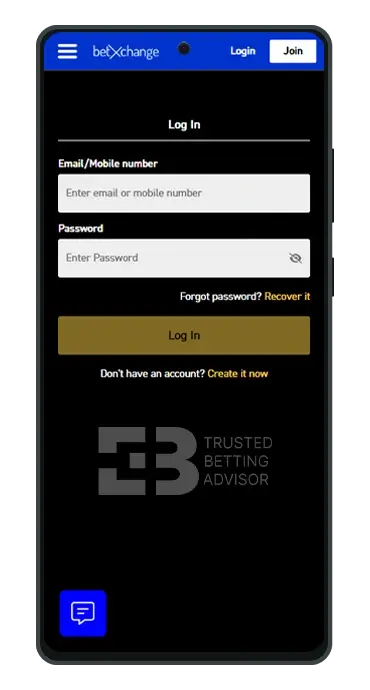
Completing the Betxchange login in the app or mobile version is essentially the same process, no matter what device you are using. I signed in using my phone because it was the most convenient option for me. However, I also checked the desktop view and didn’t find any major differences, aside from the screen orientation. To access the Betxchange login on mobile, you need to:
- Open the Betxhcnage mobile site or launch the app;
- Select the login button at the top of the page;
- Enter your registered email or mobile number;
- Type in your password;
- Confirm with the button at the bottom of the page.
On PC, the platform appears wider in landscape mode compared to the streamlined portrait view on mobile. If you’re using an Android device, you can download the BetXchange app and register with it as well. The view of the platform on the app is similar to the mobile browser version, so registration will feel the same.
Login Problems and Solutions
While the Betxchange platform is pretty reliable, there are certain issues common among users, including incorrect details and failure to meet FICA requirements. Here are some of the possible issues.
- Incorrect credentials – This is one of the most common hiccups for casual players. To avoid that, make sure you’re using the correct email address or mobile number you registered with. It is also common not to remember your password. In such cases, password recovery is the best approach.
- Account restricted – Most of the time, you can receive an account restriction if you fail multiple attempts to log in to Betxchane. If this happens or if your account is blocked or suspended for any other reason, reach out to support. They know exactly how to resolve such issues.
- FICA or verification issue – Some account features can get restricted if you haven’t done your FICA verification. While the procedure takes as long as 48 hours, some users do not get accepted even after that. Usually, the bookmaker sends you a notification with the reasons behind the denied verification. Most of the time, it is because of the quality of the images – they need to be clear, with 4 visible edges and colored.
- Website is not loading – If the website is not loading, again, there are several potential reasons. The first and most common one is scheduled maintenance. This procedure is usually used by the dev team to take their time fixing bugs or adding new features. Maintenance mode is usually on for up to 30 – 40 minutes, so your best approach is to wait. If the website is not working after a couple of hours, you can try other approaches, such as clearing your browser cache or reaching out to support.
How do I recover my Betxchange password?
If you have forgotten your account password, open the www Betxchange login form and select the “Recover it” button, located right below the password field.
Follow the instructions on the screen and provide the requested details, such as your registered email address and mobile phone number.
Once the recovery procedure is complete, you can return to the login page and use the updated password to access your account.
BetXchange Register
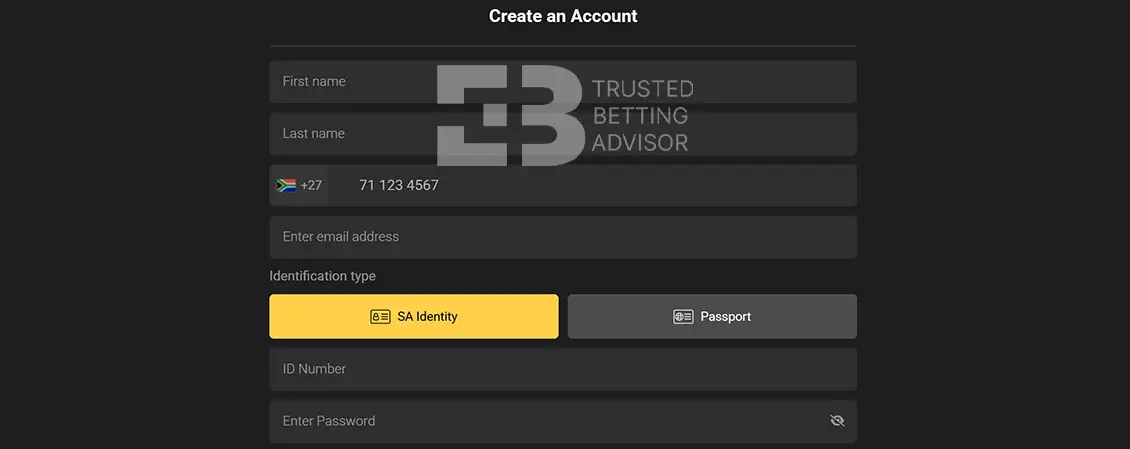
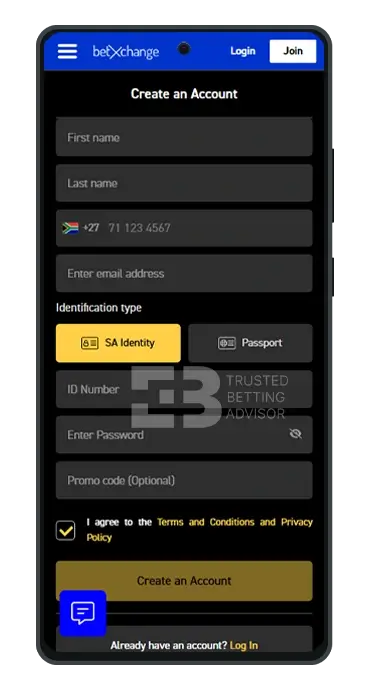
Registering a new account on BetXchange is simple and doesn’t involve too many steps. It took me just three minutes to fill the single-page sign-up form and complete the BetXchange login my account login. To get yours done, follow the BetXchange register and login steps below:
- Open the official website of BetXchange and click the “Join” button at the top of the page.
- Enter your full name, active phone number, and email address.
- Next, choose your preferred identification type between an SA identity card or an international passport.
- For passports, provide the passport number and your birth date. For an ID card, enter the number.
- Next, create a strong password to protect your account and agree to BetXchange’s terms and conditions.
- To finish up, click the yellow “Create an Account” button and you’re done.
Before using your account, you’ll need to confirm your BetXchange registration by SMS. A text message will be sent immediately to your phone number, which will contain a 6-digit code and link. All you have to do is go to your inbox, click the link and your registration will be confirmed.
BetXchange Registration Information
The most important personal detail you need to successfully complete the BetXchange registration procedure is your phone number. You must ensure that the line you use is active and can receive text messages. Although the confirmation message included a code and a link, I didn’t need to enter the code anywhere on the website; just clicking the link was enough.
In addition to your mobile number, you’re also expected to provide your full legal name, email address, and identification. All information entered into the BetXchange sign up form must be accurate and written to match your chosen identification document. Unlike some bookmakers, BetXchange doesn’t initiate FICA verification automatically at this point. You will, however, need to be verified before making any withdrawals.
In addition, you don’t need to worry about how your information is handled, because the bookie processes it in line with POPIA compliance and its Privacy Policy.
Some users still search for the Keith Ho BetXchange register, because of the brand’s historical connection, but new users should complete registration through the current BetXchange website or app.
BetXchange Register Terms & Conditions
BetXchange Western Cape (Pty) Ltd is a duly registered company with the authorisation to accept customers. However, your registration and use of the website are governed by various T&Cs and policies. The document is quite extensive, but I’ve provided a list of the most essential terms below to guide you:
- No South African under the age of 18 is permitted to register and engage in gambling on BetXchange.
- It is necessary that you provide only your correct personal information while opening your account.
- In compliance with FICA, BetXchange is authorised to conduct identity verifications on your account.
- You must ensure that all BetXchange login details provided during registration remain up to date at all times.
- Any changes made to your BetXchange register information should be updated as soon as possible in your account.
- Maximum win limits are imposed on all bets placed on the website. The specific details can be found in Part D of the T&Cs.
- Your betting transactions are not taxed by BetXchange, except those placed on horse racing events, which is currently 6%.
BetXchange FICA
After completing the BetXchange sign up process, the operator is obliged to verify your identity and physical address. This is done in accordance with the terms of the Financial Intelligence Centre Act No. 38 of 2001. Usually, FICA verifications are conducted during registration but BetXchange only makes it compulsory before withdrawals.
Certain personal documents are reviewed during the process, and you can do it manually or have the support team take care of it. For manual verification, simply click your profile and tap the “Verification” button on the drop-down menu. You’ll be given a list of documents to upload, which will then be verified within 24 hours.
The other way to go about it is to send copies of your documents by email to accounts@betxchange.co.za or via fax to 0864155634. All forwarded documents must be clear and have very clear details that match your login BetXchange information. The following are what will be required:
- For proof of identity: A copy of your identity document, an identity card (both sides), or a passport.
- For proof of address: A utility bill, a municipal rates and taxes invoice/statement, a lease in respect of property being rented by you, a bank statement stamped by the bank, a bond account statement, or an invoice in respect of a store card.
Please note that BetXchange will not accept documents certified by a Commissioner of Oaths longer than 3 months. For copies that are used to verify your address, they should not be older than 3 months either.
BetXchange Sign Up Bonus
One of the benefits of signing up at BetXchange is the promotions. You can claim a sports or casino BetXchange sign up bonus after registration and meeting the deposit requirement. Other offers are available for returning customers, and you won’t need any BetXchange promo code to claim any.
- Max. Amount: R20 000
- Percentage: 100%
- Min. Deposit: R10
- Min. Odds: 1.90
- Wagering: 1x
How Do I Make My First BetXchange Deposit?
The deposit process at BetXchange is pretty easy once you’ve confirmed your new account. It’s important to add funds to your balance as soon as possible, so you don’t miss out on the welcome bonuses. Here’s how to get it done quickly:
- Open the website and click the “Login” button at the top of the homepage.
- Enter your BetXchange log in information (email or mobile number), followed by your password.
- Click the profile button at the top of the page. You can identify this by looking for the abbreviation of your names.
- Now, tap the “Deposit” button to view the list of supported payment methods on BetXchange.
- Choose your preferred option and enter a deposit amount, which should be at least 10 ZAR.
- Finally, complete the process by clicking “Deposit” and follow any other instructions that may be given.
| Payment Method | Deposit Minimum | Deposit Maximum | Time for Deposit |
|---|---|---|---|
 Ozow Ozow | R10 | R100 000 | Instant |
 ApplePay ApplePay | R10 | R100 000 | Instant |
 Capitec Pay Capitec Pay | R10 | R100 000 | Instant |
 Visa Visa | R10 | R100 000 | Instant |
 MasterCard MasterCard | R10 | R100 000 | Instant |
 EFT (Electronic Fund Transfer) EFT (Electronic Fund Transfer) | R10 | No Limit | Instant |
 1VOUCHER 1VOUCHER | R10 | R1500 | Instant |
 OTT Vouchers OTT Vouchers | R10 | R5000 | Instant |
 Blu Voucher Blu Voucher | R2 | R1000 | Instant |
 Samsung Pay Samsung Pay | R10 | - | Instant |
 Masterpass Masterpass | R10 | - | Instant |
 Shoprite Shoprite | - | - | - |
Common Registration Problems & Solutions
There are several reasons why your BetXchange registration may be unsuccessful. It’s important to know the common problems that might lead to this and be ready to resolve them. Below are some things that could cause registration issues and their solutions:
- Duplicate account: If your BetXchange account login details have been used previously to open an account, the system will detect this and prevent you from signing up. To avoid this, ensure you’re using your personal information and not anyone else’s.
- Wrong user credentials: If your name, phone number, or date of birth does not match the information on your document, you may be unable to register. To resolve this, ensure you enter your www.betXchange.login info as it appears on your passport or SA identity card.
- Failed SMS verification: Signing up with an inactive phone line or someone else’s cell number will make it harder for you to receive the confirmation text. To avoid this, use your personal mobile number during the BetXchange register process.
- Restricted access: Only players residing in South Africa can open an account on BetXchange. If you’re outside the country or you have your VPN turned on, you may be unable to register. The only way to resolve this is to register your account from within the country.
FAQ
Is Betxchange legit in South Africa?
Yes, Betxchange is licensed with the Western Cape Gambling and Racing Board, and the platform is intended for players aged 18 or older. Betxchange also appears in the National Gambling Board (NGB) and provides responsible gambling tools, including self-exclusion options.
What documents do I need for Betxchange registration?
You will start your BetXchange registration with your personal details, mobile number, email, ID or passport. For FICA, when needed, the operator will ask for a South African ID card or passport, as well as proof of address (a utility bill or bank statement no older than 3 months).
What is the Betxchange sign up bonus no deposit?
A BetXchange sign up bonus without deposit is not always available as a standard offer. The main welcome bonus usually requires a qualifying deposit. We suggest you to always check the latest BetXchange promotions page and bonus terms before registering or claiming an offer.
How long does BetXchange registration take?
BetXchange registration usually takes around 2-3 minutes. You also may need to confirm your account by SMS after submitting the form. FICA verification can take longer, and you may be obliged to do it before your first withdrawal.
