

BC Game Login


Knowing the BC Game login registration procedure is fundamental for any Kenyan player looking to dive into one of the most technologically advanced gambling sites available today. After spending several days testing BC Game, I found that the entry process is surprisingly grounded and user-friendly for locals. Whether you are a fan of high-stakes casino games or sports betting on the KPL, getting past the front door requires a few specific steps that differ from your average local sportsbook.
In this comprehensive review, I will break down exactly how to manage your BC.Game login credentials, and provide you with direct solutions for those annoying “Invalid Captcha” or “Account Blocked” messages.
| BC Game Registration Took Me: | 1 minute |
| Mobile Number Required | Yes |
| SMS Confirmation | No |
| Immediate Verification Needed | No |
BC Game Login My Account – Step by Step
Accessing your player dashboard via the BC Game login Kenya is a seamless affair, provided you have chosen a secure method during your initial setup. From my personal experience, the site is excellent at session management, but I highly recommend saving your details in a secure browser manager. This is due to the fact that the sportsbook offers multiple ways to enter, which can get confusing.
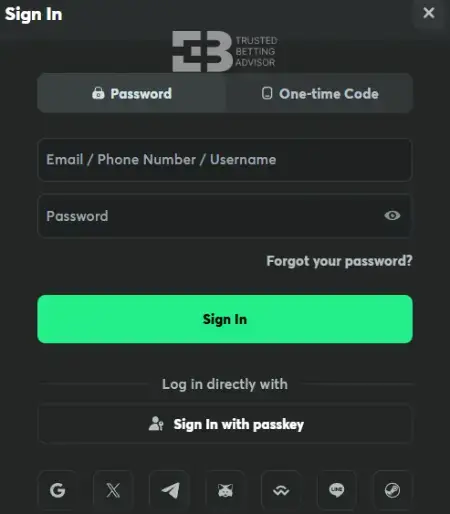
- First, just head over to the official BC Game Kenya site. You will find the grey “Sign In” button right there at the top right of the homepage.
- From there, you can log in using the email, username or phone number you used to sign up. If you have already linked a social account like Google, X, or Telegram, you can just tap one of those icons to get in faster.
- BC Game also supports passkeys, which is actually a pretty smooth way to sign in if you want to skip the password hassle.
- After you have chosen your method, enter your details. Just remember that if you are using a social media login or a passkey, you will not need to type in a password.
- Lastly, if you have wisely turned on Two-Factor Authentication for that extra layer of security, you will just need to grab the 6-digit code from your Google Authenticator app to finish up.
BC Game Login Problems in Kenya
Even the most robust systems have their off days. Most login issues I faced were related to local network stability or simple data entry mistakes rather than platform-wide crashes.
Wrong Verification Code
If you are getting a “Wrong Verification Code” error, it’s usually popping up during 2FA or a password reset. One common culprit I have noticed is your phone’s system time – if it isn’t perfectly synced with the network time, Google Authenticator codes will just keep failing.
To fix this, just jump into your Authenticator app settings and select “Time correction for codes” to get everything back in sync. Also, keep an eye on that 30-second timer; those windows move fast, so make sure you aren’t trying to use a code that’s already expired by the time you hit enter.
Invalid Login or Password
Getting that “invalid” message is usually just a typo, but it’s a total pain. First off, BC Game is case-sensitive – double-check that your Caps Lock isn’t sabotaging you. Also, if you are on a phone, watch that auto-fill feature since it’s notorious for sneaking an extra space at the end. One big tip: if you miss three times, just walk away for ten minutes. If you keep hammering at it, you’ll trigger a temporary IP lockout, and then you’re really stuck waiting.
Forgotten Password
This error happens to the best of us, especially when you are dealing with strong passwords. If yours has slipped your mind, just click the “Forgot Password” link on the login screen and enter your registered email address. If you do not see the reset mail within a minute or two, go hunt through your Spam folder – these links get buried there all the time. Once you find it, just follow the instructions to set up a fresh, unique password, and you’ll be back into your account.
Invalid Captcha
BC Game uses a “Slide to Complete” or “Click in Order” captcha to prevent bot attacks. If your internet speed lags, the captcha might time out or fail to register your movement. To not experience such inconvenience, refresh the login page and generate a new captcha. If you are on a mobile Safari or Chrome browser, try switching to “Desktop Site” mode. This will make the interactive elements more responsive.
BC Game App Login
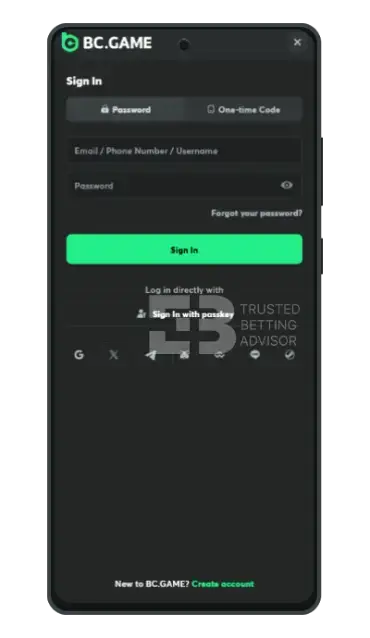
For those who prefer betting while stuck in Nairobi traffic, the mobile experience is a game-changer. The BC Game login app process is actually faster and easier than the desktop site because it integrates with your phone’s security features.
- Firstly, launch the BC Game application on your Android or iOS device.
- Then, tap on the BC Game mobile sign-in button at the bottom.
- If you have already logged in once, you can enable Fingerprint or Face ID. This will spare you the hassle of typing long passwords on a small keyboard.
- Lastly, ensure your GPS is on. The app sometimes checks if you are within a serviced region (Kenya) before allowing full access to the sportsbook.
BC Game Registration Steps
Creating an account is the first step toward claiming the massive welcome package. To register BC Game com successfully, you need to follow a specific flow to ensure your account is eligible for rewards.
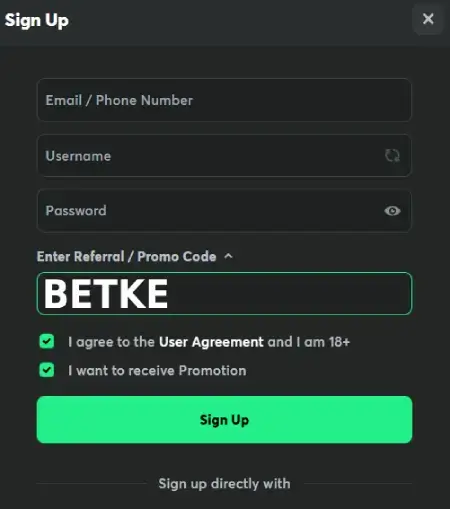
- Start by clicking the green “Sign Up” button in the top right corner of the homepage.
- Then, type in your email or phone number. I personally recommend Email for better recovery options.
- After that, create a strong password (at least 8 characters with a number and a symbol).
- BC Game also gives you the opportunity to register through your social media account. The options include: Gmail, X, Telegram, GitHub, Discord, LINE, and Steam. If you choose any of these, you will not have to create a username and password, which will speed up the sign-up process.
- Lastly, agree to the User Agreement and hit “Sign Up” to finish the registration process. bbutton href=”operator” getcolors=”1″ icon=”arrow-right” text=”register at bc game”]
BC.Game Registration Information
When you first sign up BC Game, the initial form is deceptively simple – just an email and a password. However, do not be fooled into thinking that is all you need. To actually use the full suite of features, you will eventually need to head to your “Global Settings” and fill in your “Personal Profile.”
This section requires your legal first and last name, date of birth, and your physical address in Kenya. During my testing, I found that the BC.Game registration remains “Basic” until this is done. You can deposit and start playing immediately. However, the moment you want to initiate a withdrawal, the system will flag your account for missing personal details. It’s important that all additional info that you provide is the same as it appears on your Kenyan ID or Passport, because you risk being locked during the verification stage.
BC Game Sign up Terms & Conditions
Before you dive headfirst into betting, there are a few “fine print” items that I noted during my BC.Game login setup. Understanding these can save you from a permanent ban later.
- Age Requirement: As with all other online gambling sites, you must be at least 18 in order to play. Thus, try not to lie about your age since it will be checked during KYC.
- One Account Policy: BC Game is incredibly strict about multiple accounts. If the system detects a second account coming from the same IP address or device ID, it may freeze both accounts and the funds within them.
- Prohibited Software: Using VPNs to access the site from restricted regions is a violation of their terms. If you are in Kenya, stay on your local network.
- Wagering Rules: Bonus funds are locked until specific wagering requirements are met. You cannot withdraw a bonus immediately after receiving it.
Account Verification
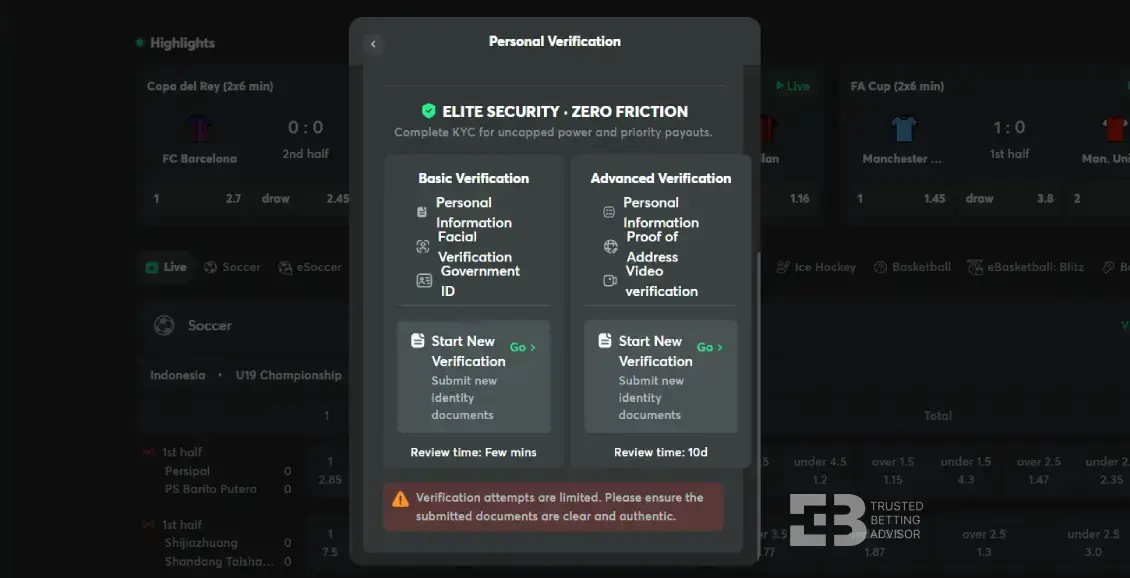
Verification is the “make or break” stage of your journey. While you can perform a BC Game login and play for a while without it, you aren’t truly the owner of that account until you pass the Know Your Customer (KYC) checks.
I went through the process myself, and here is what to expect. For the basic verification, you will need to upload a high-resolution photo of your Government ID (front and back). Additionally, there is a “Facial Verification” requirement where you need to take a picture of your face holding your ID card.
The team usually reviews these documents in a few minutes, which is much faster than the Advanced Verification, which might take up to 10 days. For this verification, you will need to send proof of your address and make a video verification.
I found that if your photos have any glare or shadows, they will be rejected immediately, so find a well-lit room before you start snapping pictures!
BC Game Register Bonus for Kenyan Players
Newcomers are often drawn in by the promise of a massive welcome package. When you first enter your sign up BC Game promo code, you unlock a multi-tiered deposit match that can significantly boost your starting bankroll.
- Max. Amount: 2 578 335 KES
- Min. Deposit: 1300 KES
- Bonus code:
- Wagering: 20x
Common Registration Problems & Solutions
While I was testing BC Game, I had a few problems that might frustrate new users. For starters, the error “Email Already in Use” usually occurs if you previously signed up via a social login like Google and forgot about it. The solution is to use the recovery tool rather than trying to create a second account.
Another issue is the “Regional Restriction” message. If you are using a public Wi-Fi that routes through a foreign server, BC Game might think you are in a restricted country. Always use a local Kenyan SIM data connection to ensure the login BC Game bet system recognises you as a legitimate local player.
Finally, if you can not click on the green “Sign Up” button and it is not working, check your browser extensions. Sometimes ad-blockers interfere with the registration scripts, so try to disable them for 5 minutes while you finish your registration.
FAQ
How to register BC Game in Kenya?
To complete your BC Game sign up, visit the official site and enter your email or phone. After that, choose a password and click “Sign Up.”
How do I recover my account at BC Game?
If you lose access, click the “Forgot Password” link from the Login pop up window. Next, enter your email to receive a reset link for a new password immediately.
Why is my BC Game account not opening?
If you are not able to open a new BC Game account, this is actually because of an unstable internet connection or because of browser cache. To fix this up, try clearing your cookies, or download the mobile app to continue.
Can I have 2 BC Game accounts?
No, BC Game strictly forbids multiple accounts per user. Creating a second account will likely lead to both being permanently blocked and funds frozen.
What is the BC Game lite login?
The BC Game sign in lite is a stripped-down version of the portal designed for older mobile devices or areas with very slow 2G/3G internet speeds.
