

Betwinner App & Mobile Version

Registered Betwinner customers can bet on sports and play casino games on the operator’s mobile app. The iPhone version and the Betwinner APK download file for Android are both available directly from the official website. The installation process is simple and signing in to your account with your Betwinner mobile login details is seamless.
Using the application has several advantages over the website, especially with the push notification and PIN/biometric features. The featured betting sections are also similar to what you’ll find on the desktop version. In this review, I’ll show you where to find the Betwinner app and how to use it after installation.
How to Download Betwinner App for Android
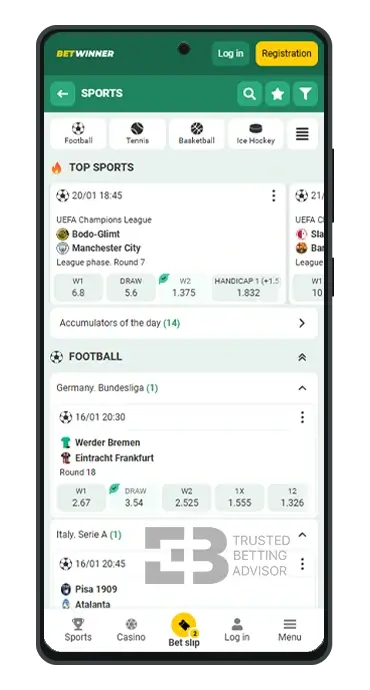


To get your hands on the Betwinner mobile app for Android, visit the main website of Betwinner by clicking the button below. On the site’s homepage, click the main hamburger menu and scroll to the bottom of the list.
Next, tap “Mobile Application”, which is just below the “Consultant” button and you’ll be redirected to the Betwinner app download page. It’s important to remember that both casino and sports betting are available on the software, so you’ve got a full 360° coverage for online gaming.
Is Betwinner APK Available in the Google Market?
No, you won’t find it on the Play Store which is probably due to gambling restrictions. The only way to get the Betwinner APK download file is from the official website.
Betwinner App Android Requirements
Before you download the Betwinner APK file, your Android system should meet these requirements:
- Latest App Version: 5.2.3
- Compatibility: Android 4.1 or higher (Android 10 and above for best performance)
- Storage Space Required: At least 200 MB
How to Install Betwinner Android App
Here’s a Betwinner app download tutorial to guide you through the installation process.
- Launch Google Chrome on your mobile device and open the Betwinner website.
- Expand the hamburger menu at the bottom right corner of the screen.
- Scroll down and tap “Mobile Application” to get to the page with the Betwinner APK link.
- Start the download process and wait a few seconds for it to finish.
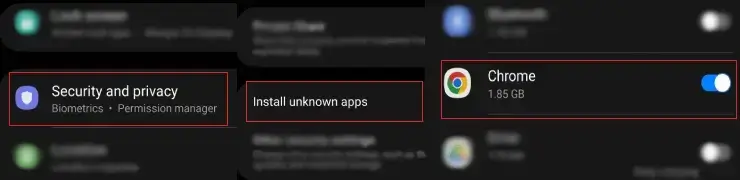
- Go to your device settings and allow Chrome to “Install Unknown Apps”.
- Now, head back to the installation screen and tap “Install” to complete the process.
- The Betwinner download APK will now be installed successfully, and you can tap “Open” to start using it.
How to Download Betwinner App for iOS


Downloading the Betwinner app for iOS devices follows a similar procedure as the Android version. The iOS application also offers users access to casino games and sports betting and has the same features available on the main desktop website.
Like the Android version, it’s available on the operator’s official website. You can find your way to the download Betwinner app page from the main menu. There, you’ll find a direct link, which lets you install the app on devices running iOS.
Is Betwinner App Available in the Apple App Store?
Yes, a dedicated Betwinner iOS application can also be found on the Apple App Store. From my checks, however, its availability is dependent on those regions where it’s supported. Regardless of this, you can still always get it straight from the Betwinner app store on the website.
Betwinner App iOS Requirements
The necessary parameters for installing the Betwinner iOS app on iPhones are:
- Latest App Version: 206.24
- Compatibility: iOS 9 and above
- Storage Space Required: At least 250 MB
How to Install Betwinner App on iPhone?
Installing the Betwinner app for iPhone is simple and takes two minutes at most. Here’s how to follow through:
- Launch Safari and open the official Betwinner website.
- Go to the mobile application download page and you’ll see the Apple logo.
- Click the download button and the iOS Betwinner app will be downloaded on your device.
How to Use the Betwinner Mobile App?
After installing the application, the betting software becomes available to use whenever you want. All you have to do is tap the Betwinner download thumbnail on your home screen to launch it. You’ll then need to create a new account or simply log in to your existing one.
The main betting sections featured on the app are sports, eSports, casino, and win games. You can sort visit each from the homepage or from the app’s main menu. In terms of user experience, I found the interface and overall navigation impressive. Although the application occupies as much as 200 MB of internal storage while in use, it still feels lightweight.
Some standout things I liked about the Betwinner app are the added security features. There’s a PIN code and biometric lock option for added security which are good tools to take advantage of. You should also activate push notifications, so you can get real-time updates sent to your phone’s notification bar.
Betwinner App Login and Registration


The mobile registration and login process on the Betwinner app is not so different from the website version. I noticed, however, that instead of four sign-up methods, only three are available here (no social network option).
Notwithstanding, I’ve always preferred one-click registration, and here’s how to go about it:
- Launch the installed Betwinner app on your smartphone or tablet and click “Registration”.
- Tap the one-click option from among the listed sign-up methods.
- Select your country and choose the currency you want your account to be based on. Cryptocurrencies are also supported.
- Agree to the privacy policy, terms and conditions, and click “Register” to finish.
It’s important to add all missing personal information after registering successfully. You can do this from your account profile once you log in using the steps below:
- Open the application and click the “Log In” button.
- Enter your Betwinner mobile login details in the spaces provided. This includes your email/ID and password.
- Tap “Log In” after providing this information and you’ll be granted access to your account.
Betwinner Sports Betting App
The sports betting section on the Betwinner app features over 40 sports across popular and niche disciplines. The top-placed options to bet on are football, tennis, basketball, and ice hockey. Over 1,000 events are covered daily and filters are provided to help you find your favourite matches.
The category filter is the main option, which allows you to choose between live or pre-match events. You can also select the “Stream” option if you want to see games that come with live broadcasts. I noticed that the arrangement of competitions is more streamlined than the website. You can easily find what you want just by tapping the relevant button and good enough, everything loads fast.
There’s an additional time filter also that lets you sort matches according to their expected kickoff time. Options include 30 minutes, 1 hour, 2 hours, and up to 48 hours. Like on browsers, the bet slip on the Betwinner mobile app is centred at the bottom of the screen. To add selections, simply tap your bet option, and it will be updated on the bet slip.
- Alpine Skiing
- American Football
- Awards
- Basketball
- Biathlon
- Boxing
- Chess
- Cricket
- Cycling
- Darts
- Entertainment
- Floorball
- Football
- Futsal
- GAA Football
- Golf
- Handball
- Ice Hockey
- MMA
- Netball
- Rugby
- Snooker
- Tennis
- Volleyball
- Baseball
- Table Tennis
- Bandy
- eSports
- Horse Racing
- Greyhounds
- Formula 1
- MotoGP
- Aussie Rules
- Bowls
- Gaelic Hurling
- Motor Sports
- NASCAR
- Politics
- Ski Jumping
- Specials
- Speedway
- Surfing
- Trotting
- TV Shows and Movies
- Virtual Sports
- Water Polo
- Winter Sports
Betwinner Casino Games on a Mobile
Over 10,000 casino games can be played by registered Betwinner app users who enjoy this entertaining activity. I particularly liked how well the casino section has been streamlined on the app compared to the web version. On the homepage, the category filter lets you choose from slots, live casino, TV games, bingo, and scratch cards.
Crash games like Aviator and JetX are also listed as major categories, which makes sense considering their popularity. Among the popular slots, my favourite titles include 777 Juicy Wins, Story of Medusa II, and Gates of Olympus 1000. The live casino subsection also features many decent games, with top choices like Crazy Time, Speed Roulette, and Grand Baccarat.
Regardless of your game choice, something you can’t miss when playing is the image quality. Betwinner has developed the application to support HD visuals for an excellent gameplay experience.
- 1x2 Gaming
- BF Games
- Evolution Gaming
- Iron Dog Studio
- Kalamba
- PG Soft
- Playson
- Thunderkick
- Pragmatic Play
- Play'n GO
- NetEnt
- Red Tiger Gaming
- Blueprint
- Revolver Gaming
- Quickspin
- High5
- Playtech
- Netgaming
- Realistic Games
- Hacksaw
- Greentube
- 3 Oaks
- Spinomenal
- Barbara Bang
- Mancala Gaming
- Wazdan
- Betsoft
- BGaming
- Habanero Gaming
- Tom Horn Gaming
- SmartSoft
- Winspinity
- Gambit
- 7Mojos
- Holle Games
- Mascot Gaming
- KAgaming
- NETGame
- NoLimit City
- Eurasian Gaming
- Slot Factory
- MrSlotty
- Simple Play
- NGMGame
- Belatra
- Fazi
- Betixon
- Platipus
- DLV
- 5Men
- G Games
- OneTouch
- Aiwin Games
- Espresso Games
- 1spin4win
- LeapGaming
- Pari Play
- True Lab
- Zeus Play
- Red Rake
- Apollo Games
- Aspect Games
- LGD Gaming
- Concept Gaming
- PlayStar Gaming
- SpadeGaming
- GMW
- Rival
- WorldMatch
- Swintt
- CT Interactive
- Spinmatic
- Ortiz
- BoomingGaming
- Caleta
- Inbet
- Onlyplay
- Ruby Play
- Genii
- ISoftBet
- Felix
- Superlotto
- Golden Race
- Triple Cherry
- R Franco
- Mobilots
- Synot Games
- GameArt
- Fugaso Gaming
- Spribe
- Thunderspin
- Slot Matrix
- Oryx Gaming
- Reevo
- Vibra Gaming
- Charismatic
- BetSolutions
- Gamebeat
- Endorphina
- Zillion
- Altente
- Aviatrix
- CQ9
- Naga Games
- IGROSOFT
- Turbogames
- Amigo Gaming
- Boldplay
- Funky
- BigPot Gaming
- Fastspin
- TaDa Gaming
- Capecod
- TopSpin
- Advantplay
- Arisen Gaming
Betwinner Mobile Version Review

The mobile version of the Betwinner platform is equally enjoyable and doesn’t lack any of the features and products on the desktop. You can access it using a Chrome or Safari mobile browser, and from my experience, the pages loaded quickly without lagging. The Betwinner mobile site is also a fantastic alternative for players who find PCs cumbersome and don’t fancy installing unnecessary apps.
Betwinner App Features
The Betwinner mobile app gives you access to every feature found. Here’s a brief outline of the available options and what they do:
- Bet Slip Sale – If you change your mind about a bet you placed, this tool lets you sell your bet slip to Betwinner to get a refund of your full stake. It’s almost like a cash-out feature, but Betwinner doesn’t offer this.
- Live Streaming – You can choose from dozens of live matches and watch the action in real time. Simply click the “Stream” option in the sports menu, and a list of sports that are currently being broadcast live will be shown to you.
- Advancebet – With advancebet, you get extra funds to bet with based on an evaluation of your wager and potential returns. Clicking “Find Out” on your bet slip will show you the amount you’ve been given, but it can only be used on live events or pre-match games that will kick off within 48 hours.
- Results – All results of previous events can be found on this page in the Betwinner app. Live results are also available, and the advantage of the feature is that it presents everything in one location.
Betwinner Mobile Bonus
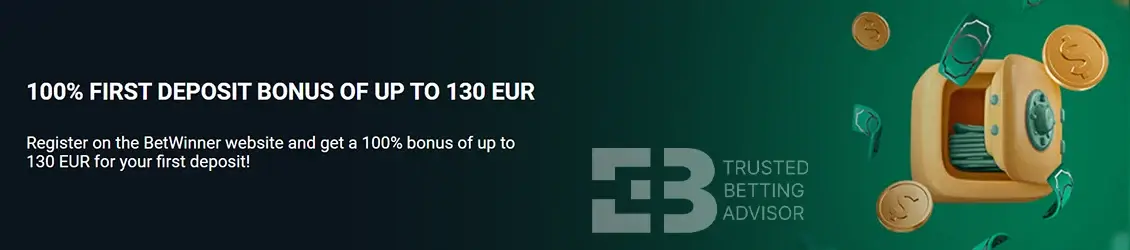
Betwinner does not offer any promotion that’s specifically for mobile app users. When you install the application and log in, you’ll have access to the regular sports welcome bonus on the website. When you register with our exclusive Betwinner promo code, you’ll get a boost on this offer, which gives you more to bet with.
- Max. Amount: €130
- Percentage: 100%
- Min. Deposit: €1
- Bonus code:
- Min. Odds: 1.40
- Wagering: 5x
Betwinner Mobile App Payment Methods
All banking options accepted on the Betwinner website are also available in the app. This includes the full lineup of cryptocurrencies, e-wallets, credit cards, and direct transfers. SMS deposits are not supported, but you can take advantage of the available mobile payment options.
Below, I’ve provided an overview of each supported banking method along with details on their limits:
| Payment Method | Deposit Minimum | Deposit Maximum | Time for Deposit | Minimum Withdrawal | Withdrawal Maximum | Time for Withdrawal |
|---|---|---|---|---|---|---|
 Visa Visa | $3 | $1,620 | Instant | $1.50 | - | up to 5 days |
 MasterCard MasterCard | $3 | $1,620 | Instant | $1.50 | - | up to 5 days |
 Bank Wire Transfer Bank Wire Transfer | $1 | - | Instant | $40 | $2,000 | up to 5 days |
 Jeton Cash Jeton Cash | $5 | $162 | Instant | |||
 AstroPay AstroPay | $1 | - | Instant | $1.50 | - | up to 24 hours |
 Perfect Money Perfect Money | $1 | - | Instant | $1.50 | - | up to 24 hours |
 Jeton Wallet Jeton Wallet | $5 | $100,000 | Instant | $10 | $100,000 | up to 24 hours |
 Sticpay Sticpay | $1 | - | Instant | $1.50 | - | up to 24 hours |
 Vcreditos Vcreditos | $1 | - | Instant | $1.50 | - | up to 24 hours |
 AirTM AirTM | $1 | $2,500 | Instant | $1.50 | $2,500 | up to 24 hours |
 Pay4Fun Pay4Fun | $1 | - | Instant | $1.50 | - | up to 24 hours |
 Inovapay Inovapay | $4 | $6,000 | Instant | $4 | $6,000 | up to 24 hours |
 Paylivre Paylivre | $1 | - | Instant | |||
 Skrill Skrill | $2 | - | Instant | $3 | - | up to 24 hours |
 Skrill 1-Tap Skrill 1-Tap | $2 | - | Instant | |||
 MiFinity MiFinity | $10 | $2,500 | Instant | |||
 Neteller Neteller | $5 | - | Instant | $5 | $10,000 | up to 24 hours |
 PicPay PicPay | $1 | $1,000 | Instant | |||
 Cryptocurrency Cryptocurrency | 19.14 µBTC | - | Instant | $550 | $496,427 | |
 Bitcoin Bitcoin | 19.14 µBTC | - | Instant | 10080.13 µBTC | - | up to 24 hours |
 Ethereum Ethereum | 20.00 mETH | - | Instant | 14.40 mETH | - | up to 24 hours |
 Tron Tron | 10.00 TRX | - | Instant | 48.06 TRX | - | up to 24 hours |
 Payeer Payeer | $2 | - | up to 24 hours |
FAQ
Is the Betwinner app free?
Yes, the Betwinner mobile application is free to install and use for sports betting and casino gaming. You can get from the official website under the “Mobile Application” page and download it directly.
How to get the latest Betwinner app version?
The newest Betwinner mobile app for Android is 5.2.3 and for iOS – 206.24. You can get them directly on the bookmaker’s website.
Can I redeem the welcome bonus from my mobile app?
Yes, you can. If you have not redeemed the bonus before, then you can redeem it from the mobile app or site without problems. This goes both for sports betting and for casino games.
How to withdraw from the Betwinner app?
To withdraw money from the Betwinner app, you have to select your desired amount, followed by the payment option. Keep in mind that the operator may require you to provide additional details.
